1. Opening Scenario: When a Successful Deployment Becomes a Problem
Imagine a typical Friday evening in a fast-paced engineering team where a newly deployed release passes all automated tests, yet monitoring dashboards immediately light up with spike alerts and user timeouts. Facing this high-pressure situation, rushing to debug live code or push frantic hotfixes often leads to extended downtime, which is why engineering teams rely on structured rollback strategies as a dependable safety net. Rather than gambling on rushed production changes, practitioners utilize robust recovery methods to restore service stability instantly, leaving thorough root-cause analysis for a calm post-incident review.
2. Understand the Meaning of Rollback
Before diving into specific mechanisms, it is essential to define core release concepts and understand how recovery fits into the broader software delivery lifecycle.
What Deployment Rollback Means
A deployment rollback is the intentional reversal of a software release, configuration update, or infrastructure change back to its immediately preceding stable state. When a newly deployed version exhibits critical flaws, the rollback mechanism discards or bypasses the faulty release, reinstating the exact artifact, configuration, or environment configuration that was working reliably beforehand.
Why Rollback Is Important in Software Delivery
Even the most rigorous testing environments cannot replicate every edge case, load pattern, or network condition present in production. Rollback capabilities act as an indispensable safety net. They limit the “blast radius” of a bad release, protecting users from prolonged outages, safeguarding business revenue, and reducing developer burnout during release cycles.
Difference Between Rollback, Roll-Forward, and Redeployment
- Rollback: Reverting the system to a previous, verified stable version. This is typically the fastest path to service recovery when a bug is introduced by new code.
- Roll-Forward: Pushing a new change—such as a hotfix patch—that fixes the bug introduced in the current deployment. Roll-forward is preferred when rolling back would cause data corruption or when dependencies prevent reverting to an older version.
- Redeployment: Deploying the exact same artifact again, usually to fix an intermittent infrastructure glitch or transient network failure during the initial release process.
How Rollback Fits Into a CI/CD Pipeline
In a mature Continuous Integration and Continuous Delivery pipeline, rollback is not an afterthought; it is an integrated stage. Automated gates continuously monitor error rates, latency, and health checks post-deployment. If predefined thresholds are breached, the pipeline triggers an automated rollback workflow without requiring manual intervention.
Situations Where Rollback May Not Be the Safest Option
While powerful, rollback is not a universal cure. You should avoid standard rollbacks when:
- Breaking Database Migrations: If the new release applied a destructive schema change (such as dropping a column required by the old application version), rolling back the application code will cause it to crash immediately because it expects a schema that no longer exists.
- Stateful Data Corruption: If the faulty release corrupted persistent user data or wrote incompatible records to storage, reverting the code will not repair the underlying data state.
3. Identify the Failure Before Choosing a Strategy
Execution speed is critical during an incident, but blind execution can make things worse. Teams must quickly identify and assess deployment problems using telemetry before choosing a recovery path.
Detection Mechanisms
- Application Logs: Sudden surges in stack traces, uncaught exceptions, or HTTP 5xx error codes.
- Monitoring Dashboards: Metrics tracking CPU utilization, memory leaks, request throughput, and thread pool exhaustion.
- Health Checks: Liveness and readiness probes failing repeatedly, signaling that containerized services are unhealthy.
- Error Rates & Performance Metrics: Spikes in latency percentiles (p99, p95) indicating degraded user experience.
- User-Reported Issues: Support tickets or social media reports alerting the team to broken workflows.
- Automated Deployment Validation: Smoke tests executed immediately after a deployment that fail to return expected responses.
Isolating the Root Cause
Once a failure is detected, engineers must determine whether the issue originates from:
- Application Code: Logic bugs, null pointer exceptions, or broken API integrations.
- Configuration: Incorrect environment variables, expired API keys, or misrouted endpoints.
- Infrastructure: Exhausted server resources, firewall misconfigurations, or DNS propagation issues.
- Dependencies: Downstream third-party service outages or incompatible library updates.
- Database Changes: Slow queries, missing indexes, or unoptimized table locks.
Knowing the exact source ensures you select the appropriate recovery strategy rather than arbitrarily reverting changes that may be unrelated.
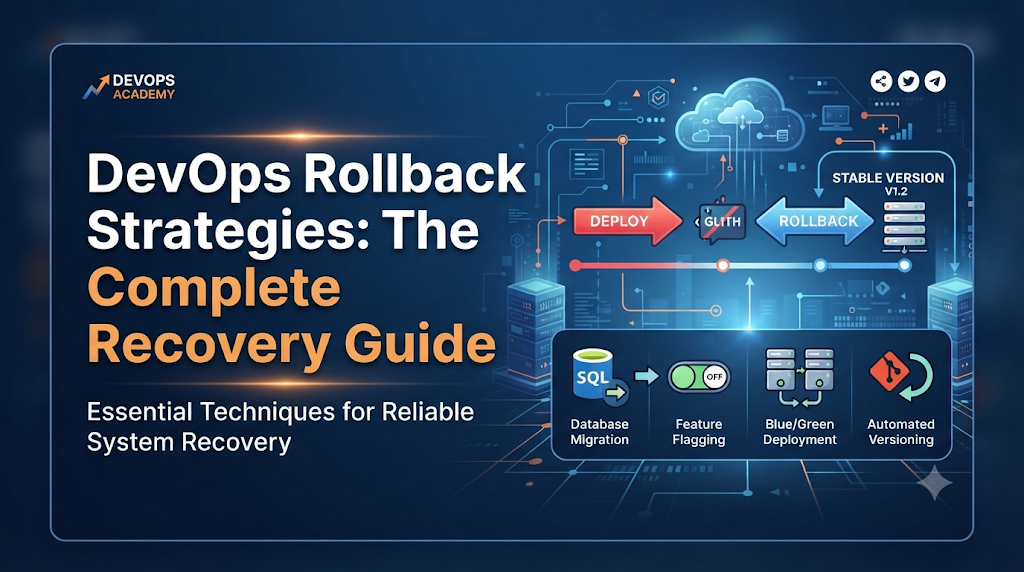
4. Seven Rollback Strategies Every Learner Should Understand
Different architectures and deployment models require different recovery techniques. Below are seven essential rollback strategies that every DevOps practitioner must understand.
A. Version-Based Rollback
Working Principles
Version-based rollback relies on immutable artifact versioning. Every build produces a uniquely tagged artifact (e.g., semantic versioning like v1.4.2 or container image digests). When a release fails, the deployment orchestrator fetches the previously tagged stable artifact and deploys it over the current release.
Suitable Use Cases
Traditional virtual machine deployments, containerized monolithic applications, and artifact repositories (such as Nexus, Artifactory, or container registries).
Advantages
- Highly predictable because the exact previous binary or image is reused.
- Simple to understand and implement in basic CI/CD tools.
Limitations
- Does not automatically handle database schema changes made by the new version.
- May involve brief downtime if instances are stopped and replaced sequentially.
Practical Example
If image myapp:v2.0.0 causes failures, the release script explicitly pulls and deploys myapp:v1.9.5.
B. Rolling Deployment Rollback
Working Principles
In a rolling deployment, instances are updated incrementally. If a failure occurs midway or after completion, a rolling rollback reverses the process by replacing instances with the older stable version batch by batch.
Suitable Use Cases
Standard cloud-native virtual machine clusters and managed instance groups where zero-downtime rolling updates are standard practice.
Advantages
- Maintains service availability during the rollback process because a subset of instances remains active.
- Avoids overwhelming load balancers by staggering instance replacement.
Limitations
- Takes longer to execute than instant traffic switches.
- Can create a mixed-version state temporarily, where old and new application versions run concurrently and communicate with shared dependencies.
Practical Example
An auto-scaling group with ten instances rolls back two instances at a time until all ten run the stable software version.
C. Blue-Green Deployment Rollback
Working Principles
Blue-Green deployments maintain two identical production environments: Blue (currently serving live traffic) and Green (hosting the new release). If smoke tests or metrics reveal issues in Green, the load balancer or DNS router instantly switches traffic back to Blue.
Suitable Use Cases
Mission-critical web applications, e-commerce platforms, and APIs where downtime must be kept near zero.
Advantages
- Extremely fast recovery time—rollback is often a simple DNS or load-balancer switch.
- Allows thorough testing of the new environment before exposing it to real users.
Limitations
- Requires double the infrastructure resources, increasing hosting costs.
- Complex database interactions require careful handling if both environments write to the same datastore.
Practical Example
Traffic router sends 100% of traffic back to the Blue environment router port while Green is kept offline for debugging.
D. Canary Release Rollback
Working Principles
Canary releases route a small percentage of user traffic (e.g., 5%) to the new version while 95% remains on the stable version. Automated metrics analyzers monitor the canary cohort. If error rates or latency exceed thresholds, the canary deployment is aborted, and traffic is instantly routed back to 100% stable.
Suitable Use Cases
Large-scale microservices architectures, high-traffic SaaS platforms, and mobile backend services.
Advantages
- Limits the blast radius to a tiny fraction of users before full rollout.
- Automated detection catches regressions before they impact the entire user base.
Limitations
- Requires sophisticated traffic routing infrastructure (e.g., service meshes like Istio or advanced ingress controllers).
- Subtle bugs affecting only specific user cohorts may take longer to surface.
Practical Example
Traffic split drops from 5% canary / 95% stable back to 0% canary / 100% stable upon detecting a surge in HTTP 500 errors.
E. Kubernetes Rollback
Working Principles
Kubernetes natively tracks Deployment revisions in its etcd store. Every time a Deployment specification changes (such as an image tag update), Kubernetes creates a new ReplicaSet and records a revision. The kubectl rollout command set allows administrators to inspect this history and revert to any prior revision instantly.
Suitable Use Cases
Containerized microservices running on Kubernetes clusters.
Advantages
- Built-in cluster-level support without requiring external scripting.
- Fast, atomic updates managed by the Kubernetes control plane.
Limitations
- Only tracks changes to the Pod template specification; does not automatically roll back external ConfigMaps, Secrets, or database schemas unless managed together.
Practical Command Demonstration
To inspect the rollout history of a deployment:
Bash
kubectl rollout history deployment/my-app
To check the current status of an ongoing rollout:
Bash
kubectl rollout status deployment/my-app
To undo the latest deployment and roll back to the immediately preceding revision:
Bash
kubectl rollout undo deployment/my-app
To roll back to a specific revision number (e.g., revision 3):
Bash
kubectl rollout undo deployment/my-app --to-revision=3
F. Configuration Rollback
Working Principles
Sometimes an application failure is not caused by bad code, but by an erroneous environment variable, feature flag toggle, security policy, or infrastructure configuration. Configuration rollback restores the previous version of configuration files, parameter store values, or Gitops manifests.
Suitable Use Cases
Cloud infrastructure managed via Infrastructure as Code (IaC), feature flag platforms, and Kubernetes ConfigMaps.
Advantages
- Rapid execution without requiring a full application image rebuild or redeployment.
- Minimizes disruption when code logic is correct but runtime parameters are misconfigured.
Limitations
- Requires strict configuration versioning and auditing to identify which parameter change caused the failure.
Practical Example
Reverting a Terraform state or Git commit that mistakenly updated database connection timeout limits to an unsustainable value.
G. Database Recovery and Rollback
Working Principles
Database rollback encompasses two very different operational concepts:
- Transaction Rollback (
ROLLBACK): An SQL command used within a database transaction to undo uncommitted changes if an error occurs during execution. - Migration Reversal / Point-in-Time Recovery: Reverting applied schema migrations or restoring a database snapshot to a state prior to a destructive deployment.
Distinguishing Transaction Rollback from Migration Reversal
A transaction rollback happens inside code execution milliseconds before committing data. A migration rollback (or database recovery) is an administrative action taken post-deployment to undo schema modifications (e.g., dropping newly added tables or columns) or restore data from backups.
Suitable Use Cases
Releasing applications that include database schema updates alongside code changes.
Advantages
- Prevents data corruption and ensures application-database compatibility.
Limitations
- High risk of data loss if point-in-time recovery rolls back valid user transactions created after the bad deployment.
- Schema down-migrations must be meticulously written and tested in staging environments beforehand.
Practical Example
Executing a downward migration script (npm run migration:undo or flyway undo) to revert a newly added table column that broke existing SQL queries.
5. Practical Lab: Recover From a Failed Application Deployment
To solidify these concepts, let us walk through a practical learning exercise simulating a deployment failure and recovery lifecycle.
Safety Warning: This lab is designed for educational environments, local Minikube clusters, or staging environments. Never experiment directly on live production systems without proper authorization and maintenance windows.
Step 1: Prepare a Working Application Version
Imagine a simple web application packaged as a container image tagged web-app:v1.0.0. It returns a health check response of Status: OK.
Step 2: Build and Deploy a New Version
The team builds web-app:v2.0.0, which introduces a bug in the database connection string configuration. The CI/CD pipeline deploys this version to your test Kubernetes cluster:
Bash
kubectl set image deployment/web-app web-app=web-app:v2.0.0
Step 3: Simulate and Detect the Deployment Problem
Immediately after deployment, automated health checks fail because the pods enter a CrashLoopBackOff state:
Bash
kubectl get pods
Expected output showing failure:
Plaintext
NAME                     READY   STATUS             RESTARTS   AGE
web-app-5d89f468-x9z2p   0/1     CrashLoopBackOff   3          45s
Step 4: Inspect Logs to Confirm Failure
Run the logs command to inspect why the application crashed:
Bash
kubectl logs deployment/web-app
Expected Result: An error message indicating Database connection refused due to invalid port configuration.
Step 5: Identify the Previous Stable Release
Check the rollout history to confirm the last stable revision:
Bash
kubectl rollout history deployment/web-app
Step 6: Execute the Appropriate Rollback
Since the issue is isolated to the deployment configuration/image update, execute the Kubernetes rollback command:
Bash
kubectl rollout undo deployment/web-app
Step 7: Verify Application Health and Functionality
Check the rollout status to ensure pods stabilize:
Bash
kubectl rollout status deployment/web-app
Verify that pods return to the Running state and health probes pass successfully.
Step 8: Record the Incident and Recovery Result
Log the incident details in your team’s tracking system, noting the root cause (bad configuration variable in v2.0.0) and the time to recovery (TTR).
6. How Rollback Works Inside a CI/CD Pipeline
Modern deployment automation embeds safety checks directly into the release pipeline. Here is how rollback mechanisms operate within an automated workflow:
- Deployment Gates: Automated checks that evaluate performance metrics during and immediately after deployment.
- Automated Failure Detection: Scripts or monitoring hooks (such as Prometheus alerts) that query error rates in real time.
- Approval Controls: Pause points in pipelines allowing human operators to verify canary health before promoting to 100% production traffic.
- Artifact Versioning: Immutable artifact stores ensuring that the pipeline can always fetch the exact SHA or version tag of the previous build.
- Automated Rollback Jobs: Conditional pipeline steps configured to trigger
helm rollback,kubectl rollout undo, or cloud provider traffic rerouting if exit codes or health checks fail. - Post-Deployment Verification: Automated smoke tests run post-release to confirm core user journeys function correctly.
7. Choosing the Right Rollback Strategy
No single rollback strategy fits every scenario. Choosing the right approach requires evaluating several architectural and operational factors:
| Strategy | Architecture Suitability | Recovery Speed | Data Compatibility Risk | Infrastructure Complexity |
| Version-Based | Monoliths / VMs | Moderate | Low | Low |
| Rolling Deployment | Cloud-native VMs / ASGs | Moderate | Low | Moderate |
| Blue-Green | Web Apps / APIs | Instant | Moderate | High |
| Canary Release | Microservices / SaaS | Fast | Low | High |
| Kubernetes Rollback | Container Clusters | Fast | Low | Moderate |
| Configuration | IaC / Cloud Services | Fast | Low | Low |
| Database Recovery | Stateful Applications | Slow | High | High |
Understanding these trade-offs ensures that engineering teams select a strategy aligned with their application architecture and uptime requirements.
8. The Hidden Risks of Rolling Back
Rollbacks are powerful, but they are not risk-free. Practitioners must be aware of several operational pitfalls:
- Database Schema Incompatibility: Reverting code without reverting schema changes leads to immediate runtime errors.
- Persistent User Data Changes: New code may write data in a new format that old application versions cannot parse.
- Configuration Drift: Manual changes made directly in production can cause unexpected behavior when reverting to older configuration templates.
- Dependency Version Conflicts: Rolling back an application might leave behind updated third-party libraries or shared microservices that break compatibility.
- Partial Deployment Failures: If a rolling rollback fails halfway, the cluster ends up running a fragmented mix of old and new versions.
- Stateful Application Behavior: Stateful workloads (like message queues or databases) do not support instant rolling back as cleanly as stateless web servers.
- External API Changes: If the new release integrated with a new third-party webhook or API version, rolling back the code might break communication with those external services.
- Incomplete Rollback Automation: Relying on manual rollback steps during an outage increases human error risk.
Ways to Reduce Risks
Always design deployments with backward compatibility in mind. Use database migration patterns like “Expand and Contract,” decouple schema updates from code deployments, and test your rollback procedures regularly in staging environments.
9. Rollback Readiness: What Teams Should Prepare in Advance
Reliable rollbacks are the result of thorough preparation long before an incident occurs. Teams must maintain:
- Versioned Artifacts: Immutable storage for every build artifact and container image.
- Deployment History: Clear audit trails showing who deployed what and when.
- Tested Recovery Procedures: Regularly practiced disaster recovery drills (Game Days).
- Backups: Recent, verified database snapshots and configuration backups.
- Comprehensive Monitoring: Real-time visibility into error rates, latency, and resource utilization.
- Access Permissions: Pre-authorized deployment and rollback permissions for on-call engineers.
- Clear Runbooks: Step-by-step documentation detailing exact recovery commands.
- Incident Ownership: Defined roles during an outage to prevent confusion.
Pre-Deployment Rollback Readiness Checklist
- Are all previous stable artifacts archived and accessible?
- Have database migrations been verified as backward-compatible?
- Are health checks configured to detect application failures accurately?
- Do automated pipelines include a conditional rollback trigger?
- Is the on-call team familiar with the rollback runbook?
10. Common Mistakes Learners Should Avoid
As you build your DevOps skills, be mindful of these common traps:
- Treating Rollback as Simple Redeployment: Assuming that pushing code again fixes underlying state or configuration corruption.
- Failing to Test Recovery Procedures: Writing a rollback plan on paper without ever practicing it in a staging environment.
- Ignoring Database Changes: Deploying schema changes without considering how old code will interact with them.
- Deleting Old Artifacts: Purging older container images or build artifacts to save storage space, leaving no stable version to roll back to.
- Using Unverified Backups: Assuming backups work without ever testing restoration workflows.
- Skipping Post-Rollback Validation: Declaring victory immediately after executing a rollback command without verifying that user traffic and health checks have stabilized.
11. Practice Challenges for DevOps Learners
To reinforce your understanding, try working through these three practical exercises in a safe lab environment:
- Roll Back a Failed Application Release:
- Learning Objective: Practice version-based artifact retrieval and redeployment.
- Expected Outcome: Successfully replace a faulty application build with a known stable version and verify health endpoints.
- Stop a Failed Kubernetes Rollout and Restore a Stable Revision:
- Learning Objective: Master
kubectl rolloutcommands and revision history inspection. - Expected Outcome: Abort a broken deployment and restore a prior cluster revision cleanly.
- Learning Objective: Master
- Recover From an Incorrect Configuration Change:
- Learning Objective: Learn how configuration drift impacts applications and how to revert environment variables or IaC states safely.
- Expected Outcome: Restore previous configuration parameters and verify that application errors cease.
12. Final Thoughts: Make Recovery Part of Deployment Planning
Rollback is much more than an emergency command used in the heat of a production outage. It is a foundational pillar of reliable software delivery. As you develop your engineering and deployment automation skills—whether through independent practice or guided learning resources provided by organizations like DevOpsSchool—remember that the goal of DevOps is not just to ship code faster, but to build resilient systems that recover gracefully when things go wrong.
Embrace testing your recovery workflows, understand the limitations of each strategy, and make rollback readiness an integral part of every deployment plan you build.