
Introduction
Learning DevOps is not a sprint; it is an endurance race that requires a fundamental shift in how you approach technology, moving away from the empty pursuit of certificates toward a roadmap defined by tangible, hands-on mastery. In my two decades of experience as a cloud architect and mentor, I have found that true proficiency—the kind that separates a hobbyist from a seasoned SRE—is built through the ability to solve complex, real-world infrastructure problems rather than merely finishing courses. To succeed, you must adopt a milestone-based approach, creating a feedback loop where every technical challenge serves as a metric for your growth. This structured path is at the core of the DevOpsSchool ecosystem, where the focus remains on building authentic expertise. By aligning your studies with clear, incremental objectives, you transform abstract cloud concepts into a concrete, career-ready skill set, ensuring that every hour you spend learning contributes directly to your long-term success.
Why Learning Milestones Matter
In the vast ecosystem of DevOps, it is easy to feel overwhelmed by the sheer volume of tools, frameworks, and methodologies. Without a roadmap, you are likely to drift between technologies without ever achieving depth.
Goal Setting
Milestones turn the intimidating concept of “becoming a DevOps engineer” into a series of manageable tasks. When you set a goal to master a specific concept, such as container orchestration, you are not just learning a tool; you are building a foundational pillar for your technical architecture.
Measuring Progress
How do you know you are improving? It is not by finishing a video series. You know you are improving when you can troubleshoot a production error in a local environment without relying on documentation. Milestones provide the metrics you need to evaluate your growth.
Building Confidence
Confidence in engineering comes from repetition and problem-solving. Every milestone reached reinforces your belief in your abilities, making it easier to tackle more complex topics like cluster security or distributed systems.
Identifying Skill Gaps
By breaking your learning into stages, you quickly identify where you are weak. If you struggle to deploy a simple containerized app, you immediately know that your understanding of networking or image layers is insufficient, allowing you to pivot and strengthen that specific area before moving forward.
Creating a DevOps Learning Roadmap
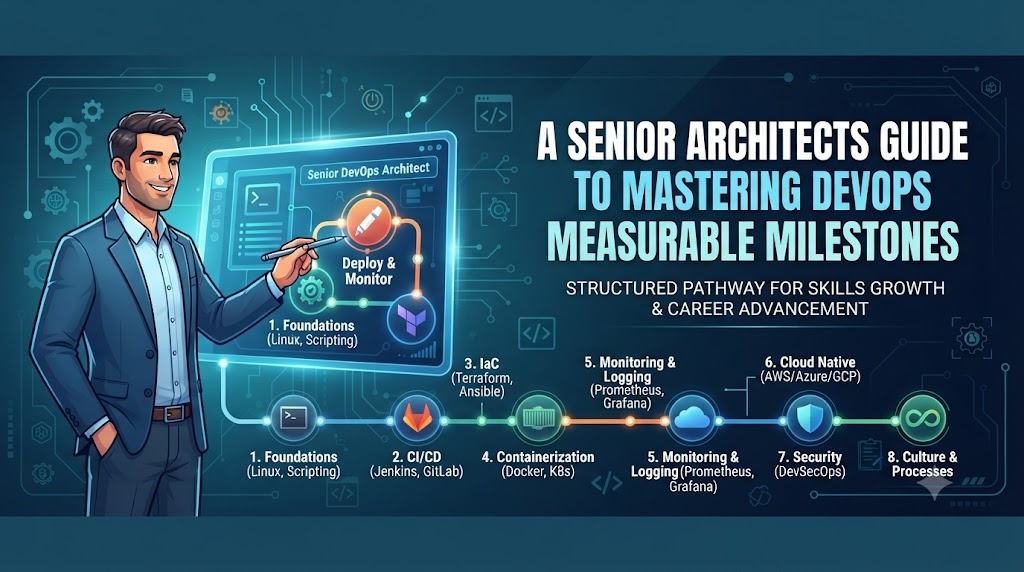
The path to DevOps mastery is logical and sequential. You cannot automate what you do not understand manually.
- Linux Fundamentals: This is your foundation. Understand processes, permissions, filesystems, and the kernel.
- Networking Basics: Learn TCP/IP, DNS, HTTP/S, Load Balancing, and Firewalls.
- Git & Version Control: Master branching, merging, and collaboration workflows.
- Shell Scripting: Automate repetitive tasks with Bash or Python.
- Docker: Learn containerization, image creation, and resource isolation.
- CI/CD: Understand the pipeline lifecycle from code commit to deployment.
- Cloud Platforms: Deep dive into AWS, Azure, or GCP services.
- Terraform & Infrastructure as Code (IaC): Treat infrastructure as software.
- Kubernetes: Manage container orchestration at scale.
- Monitoring & Observability: Master logging, metrics, and tracing.
- DevSecOps: Integrate security scans and compliance into pipelines.
- Advanced Projects: Combine everything into a high-availability architecture.
- Career Readiness: Resume building, mock interviews, and system design.
Key DevOps Learning Milestones
| Milestone | Skills to Master | Success Indicator |
| Linux Foundation | Users, permissions, SSH, package management | Ability to set up a web server from scratch |
| Git Workflow | Branching, pull requests, merge conflict resolution | Managing a multi-developer repository |
| Containerization | Dockerfiles, Docker Compose, image optimization | Running an app consistently across environments |
| CI/CD Pipeline | Jenkins, GitLab CI, or GitHub Actions | Automated build and deployment on code push |
| Cloud Infrastructure | VPC, IAM, EC2/Instances, RDS | Deploying a scalable app on a cloud provider |
| IaC Mastery | Terraform state, modules, resource management | Deploying entire environments via code |
| Orchestration | Pods, Deployments, Services, Ingress | Rolling out updates to a cluster with zero downtime |
| Monitoring | Prometheus, Grafana, ELK Stack | Alerting on system failure before users notice |
Hands-On Project Milestones
Projects are the crucible where theory becomes reality. Do not just watch tutorials; build until things break.
Build a Linux Home Lab
Stop using cloud consoles initially. Set up a Linux server on a spare machine or VM. Configure Nginx, SSH keys, and firewall rules manually.
Create Git Repositories
Start a personal project. Use feature branches, commit frequently with descriptive messages, and practice merge requests.
Containerize an Application
Take a monolithic application, wrap it in a Docker container, and reduce its image size.
Build a CI/CD Pipeline
Create a pipeline that triggers a build on code commit, runs tests, and deploys to a staging environment.
Deploy to the Cloud
Host a static site or a simple API on a cloud provider. Configure networking and security groups correctly.
Automate Infrastructure
Rewrite your manual cloud deployment using Terraform. Destroy and recreate the environment with a single command.
Monitor Applications
Deploy a monitoring agent to your server. Create a dashboard that tracks CPU usage and request latency.
Secure Deployments
Implement basic secret management. Do not hardcode passwords. Ensure your container images are scanned for vulnerabilities.
Measuring Technical Progress
True progress is measured by your reaction to failure.
- Lab Completion: Can you complete a scenario without following a step-by-step guide?
- Troubleshooting Ability: When an error occurs, do you look at logs, or do you restart the service and hope for the best?
- Automation Confidence: Do you feel comfortable writing a script to automate a task you have done twice manually?
- Documentation Quality: Can you read your own documentation from three months ago and understand how to run the project?
- Project Complexity: Are you building things that interact with other systems, or are you just running “Hello World” examples?
Tracking Soft Skill Development
Hard skills get you the interview; soft skills get you the job.
- Communication: Can you explain a technical problem to a non-technical stakeholder?
- Collaboration: Are you comfortable working in a team environment using shared repositories?
- Problem-Solving: Do you approach problems systematically by breaking them down, or do you guess?
- Documentation: Can you write clear README files for your projects?
- Time Management: Can you estimate how long a task will take and stick to it?
- Continuous Learning: Do you keep up with industry trends without getting distracted by every new shiny tool?
Certifications as Milestones
Certifications should validate knowledge, not replace it. Use them to prove to employers that you have reached a standard level of proficiency.
| Certification | Best For | Skill Level | Focus Area |
| Linux+ / RHCSA | Beginners | Foundation | OS Administration |
| AWS/Azure Solutions Architect | Cloud Engineers | Intermediate | Cloud Architecture |
| CKAD / CKA | DevOps Engineers | Advanced | Kubernetes |
| Terraform Associate | DevOps Engineers | Intermediate | IaC |
| Security+ | DevSecOps | Intermediate | Security |
Measuring Career Readiness
Use these KPIs to determine if you are ready to apply for roles.
| Metric | Why It Matters | Career Benefit |
| Projects Completed | Shows practical application | Builds portfolio |
| GitHub Contributions | Demonstrates activity | Proof of coding |
| Labs Finished | Builds muscle memory | Technical fluency |
| Mock Interviews | Improves communication | Confidence booster |
| Tech Presentations | Shows depth of knowledge | Increases authority |
| Portfolio Quality | The first impression | Interview invitation |
Common Learning Challenges
| Challenge | Impact | Recommended Solution |
| Tool Overload | Paralysis by analysis | Focus on concepts, not specific tools |
| Lack of Practice | Knowledge decay | 80% practice, 20% theory rule |
| Skipping Fundamentals | Fragile expertise | Master Linux networking before cloud |
| Inconsistent Schedule | Loss of momentum | 30 minutes daily is better than 5 hours weekly |
| Fear of Troubleshooting | Inability to grow | Break things on purpose to learn recovery |
| Unrealistic Expectations | Burnout | Celebrate small, incremental wins |
Best Practices
- Set Monthly Milestones: Define what you will have built by the end of each month.
- Practice Consistently: Build every day, even if it is just a small script.
- Build Real Projects: Avoid toy examples. Build projects that solve real-world problems.
- Document Your Work: Write blog posts or READMEs for every project. This is your portfolio.
- Review Progress Regularly: At the end of every week, assess what you learned and what you failed to learn.
- Learn from Mistakes: If a deployment fails, document why it failed and how you fixed it.
Real-World Example
Case Study: The Transitioning Developer
- Starting Knowledge: A junior web developer who knew Python but nothing about servers.
- Learning Roadmap: Focused first on Linux administration, then moved to Docker, then AWS, and finally Kubernetes.
- Hands-on Projects: Migrated a local Python app to a Docker container, then deployed it to AWS using Terraform, and finally added a CI/CD pipeline using GitHub Actions.
- Certification Milestones: Earned the CKA (Certified Kubernetes Administrator) after completing a project-heavy curriculum.
- First DevOps Job: Secured a position as a Junior Site Reliability Engineer by showcasing the GitHub repository of the automated deployment project.
- Lessons Learned: The focus on “doing” rather than “watching” allowed the candidate to explain the how and why during technical interviews, which stood out more than the certifications alone.
Common Beginner Mistakes
- Learning Too Many Tools: Trying to learn Ansible, Puppet, and Chef simultaneously is a recipe for confusion. Master one tool in each category.
- Ignoring Linux Basics: You cannot debug a network issue in Kubernetes if you do not understand the Linux network stack.
- Avoiding Troubleshooting: When a tutorial fails, don’t restart. Read the error messages. That is where the actual learning happens.
- Skipping Projects: Reading books is passive. Building is active. You retain 90% of what you build and only 10% of what you read.
- Focusing Only on Certifications: A certification is a badge. It is not a substitute for the ability to build and maintain infrastructure.
Future of DevOps Learning
The DevOps field is shifting. The future is not just about writing scripts; it is about managing complexity and systems.
- AI-Assisted Learning: Using AI tools to help debug and generate boilerplate code, allowing you to focus on system architecture.
- Platform Engineering: A shift toward creating internal developer platforms where DevOps engineers focus on the “platform” as a product.
- GitOps: Managing infrastructure state entirely through Git repositories.
- Cloud-Native Development: Designing applications specifically to run in ephemeral environments.
- Continuous Upskilling: The tools change, but the principles of reliability, security, and scalability remain.
Practical DevOps Milestone Checklist
- Master Linux command line and basic administration.
- Understand computer networking concepts (TCP/IP, DNS, OSI Model).
- Become proficient in Git (Branching, Merging, Rebasing).
- Write and execute shell scripts for automation.
- Dockerize a web application and manage volumes.
- Build a CI/CD pipeline from scratch (Jenkins/GitLab/GitHub Actions).
- Deploy an application to a public cloud provider (AWS/Azure/GCP).
- Write and apply Terraform/OpenTofu code for infrastructure.
- Orchestrate containers using Kubernetes.
- Implement monitoring and alerting (Prometheus/Grafana).
- Secure a containerized deployment (Scanning/Secrets).
FAQs
1. How do I know I’m making progress in DevOps?
You are making progress when you can solve a problem using a tool you previously struggled with, or when you can troubleshoot an error without needing to watch a tutorial video.
2. Which milestone should beginners reach first?
Always start with Linux. It is the operating system that runs 99% of the internet, cloud platforms, and container runtimes.
3. How important are projects?
Projects are the most important part of your learning journey. They serve as evidence of your skills and provide the experience required to handle real-world scenarios.
4. Should I learn Kubernetes before Docker?
No. Kubernetes is a container orchestrator. You cannot orchestrate containers if you do not understand how containers work, how to build images, and how they isolate resources.
5. How many certifications do I need?
Certifications are supplements. One or two reputable certifications (like CKA or a Cloud Associate exam) are sufficient to get your foot in the door. Focus more on your project portfolio.
6. How can I stay motivated?
Set small, achievable goals. Instead of saying “I will learn DevOps,” say “I will deploy a Nginx web server using Docker by this Friday.”
7. How long does it take to become job-ready?
It varies, but with consistent daily study (2-3 hours), it usually takes 6 to 12 months to reach a junior-level competency.
8. What should my portfolio include?
Your GitHub should include well-documented repositories containing scripts, configuration files (Terraform/Kubernetes manifests), and README files that explain the problem, the solution, and the architecture.
9. Is Linux scripting necessary?
Yes. You cannot automate infrastructure if you cannot tell the OS what to do. Bash is the language of system administration.
10. What if I get stuck on a project?
Stuck is part of the process. Read the documentation, check the logs, search GitHub issues, and isolate the specific component that is failing.
11. Is DevSecOps a separate career?
It is a discipline within DevOps. Start with DevOps, then incorporate security practices as you gain experience.
12. Do I need to be a programmer?
You do not need to be a software developer, but you must understand how to read code, write scripts, and work with configuration files.
13. How do I balance theory and practice?
Follow the 80/20 rule: spend 20% of your time reading and watching tutorials, and 80% of your time typing commands and building things.
14. What is the most common mistake?
The most common mistake is “tutorial hell,” where you only follow videos and never try to build anything on your own.
15. Does DevOpsSchool help with career paths?
Yes, it provides structured learning environments and pathways that help bridge the gap between theory and real-world employment.
Final Thoughts
DevOps is a career of lifelong learning. The tools you use today will likely be replaced by something else in five years, but the principles of automation, scalability, and reliability will remain constant. Do not chase the latest hype. Instead, focus on mastering the fundamentals, building a portfolio of real projects, and tracking your progress through measurable milestones. Stay consistent, remain curious, and remember that every experienced engineer you admire started exactly where you are today.

