
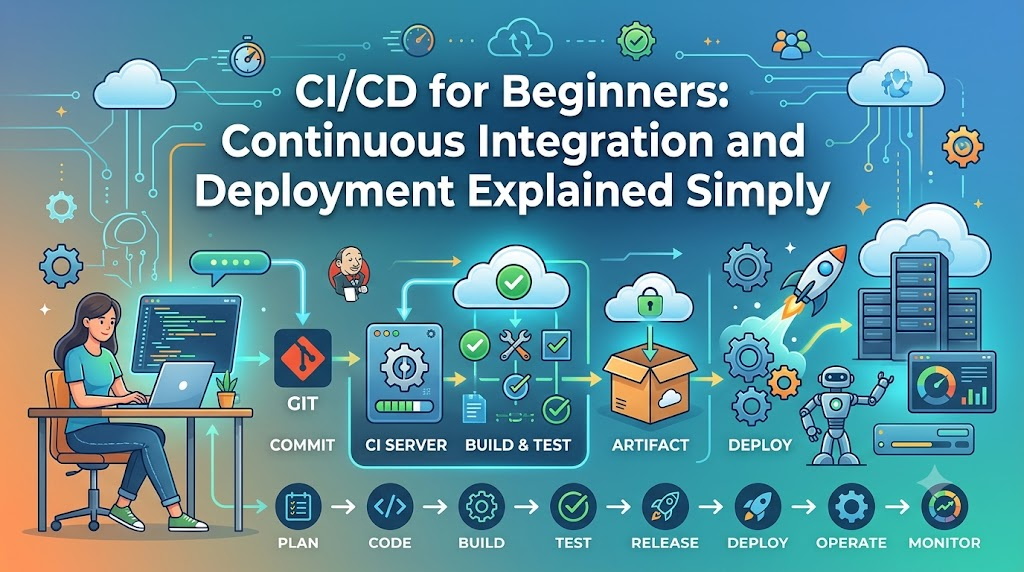
Every software team eventually faces the dreaded manual release: developers spend days combining scattered code branches, untangling messy merge conflicts, and troubleshooting sudden crashes caused by mismatched system configurations. Rushing through manual test checklists and copying raw files directly to live servers turns what should be an exciting update into a high-stakes, late-night firefighting mission. CI/CD—Continuous Integration and Continuous Delivery or Deployment—replaces this fragile routine with an automated, predictable delivery pipeline. This guide unpacks how modern pipelines eliminate release friction, automatically catch bugs before they reach users, and keep applications consistently ready for production.
What Is Continuous Integration (CI)?
At its core, Continuous Integration (CI) is a software engineering practice where developers regularly merge their code updates into a shared central repository—often multiple times a day. Every time code is merged, an automated system checks the changes by building the application and running automated tests.
To understand why this matters, consider what software development looks like without CI. When developers work in isolation for weeks on separate branches, their code drifts further apart every day. When they finally merge, resolving the differences is painful—a phenomenon engineers historically called “integration hell.”
Developer Workspace (Local Git)
       │
       ▼ (git push / Pull Request)
Central Repository (e.g., GitHub, GitLab)
       │
       ▼ (Webhook Event)
CI Server (Automated Build & Test Runner)
  ├── 1. Fetch latest code
  ├── 2. Install dependencies
  ├── 3. Compile / Build application
  └── 4. Run automated test suite
       │
       ├──► [PASS] Notify team / Authorize pull request merge
       └──► [FAIL] Block merge / Instantly alert author with error logs
How CI Differs from Simple Version Control
Pushing code to a Git repository like GitHub or GitLab is not Continuous Integration by itself. Version control simply stores your code and tracks history; it does not verify whether the code actually works.
Manually running tests on your laptop before pushing is also not Continuous Integration. Local environments frequently differ from server environments—you might have a specific database installed locally or a background tool configured that masks an error.
True Continuous Integration requires three elements:
- A central version control repository where developers contribute small, frequent changes.
- An automated build system that compiles the code and packages dependencies in a clean, reproducible environment.
- An automated test suite that validates the code against regression bugs every time a change is introduced.
What Happens During a CI Trigger
When a developer creates a pull request or pushes a commit to a tracked branch:
- The version control system fires an event (typically a webhook) to a CI runner.
- The CI runner spins up an isolated, clean operating system or container.
- It downloads the project code and resolves dependencies.
- It compiles or builds the project. If syntax errors or build issues exist, the pipeline halts immediately.
- It runs automated tests (such as unit tests and integration tests).
- If any test fails, the CI system flags the commit as failed, prevents code merging, and alerts the author with the exact failure logs.
- If everything passes, the code receives a green status, letting the team know the change integrates cleanly.
By identifying bugs minutes after writing the code, developers can fix issues while the logic is still fresh in their minds.
What Is Continuous Delivery?
While Continuous Integration focuses on validating code changes, Continuous Delivery (CD) extends automation to the release process.
Continuous Delivery ensures that software is automatically built, tested, packaged, and verified so that it is always in a releasable state. In a Continuous Delivery workflow, every change that passes automated tests can be deployed to staging or production environments at any time with minimal friction.
Release Readiness Over Manual Scrambling
In traditional environments, preparing a release involves days of manual packaging, environment preparation, and coordination meetings. In Continuous Delivery:
- The packaging process is completely automated.
- Configuration is separated from the application code, allowing the same build artifact to run across development, testing, staging, and production environments.
- Validation happens continuously in production-like staging environments.
Crucially, Continuous Delivery does not mean every change is deployed directly to live users immediately. Instead, it means the application is ready to be deployed whenever a business decision is made. The actual push to production might depend on a manual sign-off button, a business release schedule, or customer communication requirements.
What Is Continuous Deployment?
Continuous Deployment (CD) takes automation a step further by eliminating manual human approvals from the deployment pipeline.
In a Continuous Deployment model, every code change that successfully passes every stage of the automated pipeline—unit tests, integration checks, security scans, performance benchmarks, and staging verification—is automatically deployed directly to production.
Continuous Delivery vs. Continuous Deployment: The Key Difference
The distinction between the two forms of “CD” often confuses newcomers because both share the same abbreviation and rely on high levels of automation.
The boundary is straightforward:
- Continuous Delivery: The pipeline prepares the software so it can be deployed to production at any moment, but the final deployment step typically requires an explicit business trigger or manual approval.
- Continuous Deployment: There is no manual gate. If every automated validation check passes, the software deploys to production automatically.
A simple analogy clarifies the difference: Think of an online print-on-demand service.
- Continuous Delivery is like an automated printing press that prepares the file, verifies image resolution, formats the pages, prints a proof copy, and leaves the final job in the queue ready for the print manager to press a green “Print Full Run” button.
- Continuous Deployment is like an automated self-service press: as soon as the file passes all automated pre-flight checks, the press automatically prints and ships the book to the customer with zero human intervention.
CI vs. Continuous Delivery vs. Continuous Deployment
To see how these practices relate, compare them side by side:
| Dimension | Continuous Integration (CI) | Continuous Delivery (CD) | Continuous Deployment (CD) |
| Main Objective | Validate that code changes merge cleanly and function properly. | Keep code continuously tested, packaged, and ready for production release. | Deliver verified changes to live production users automatically without manual delays. |
| Automation Scope | Automated code checkout, build, linting, and automated testing. | All CI steps plus packaging, environment configuration, and automated staging deployment. | Entire lifecycle automated end-to-end, from commit to production release and health verification. |
| Production Release | Out of scope (focuses on code validation). | Requires an intentional manual approval or business release trigger. | Fully automated upon passing all pipeline checks. |
| Human Gates | Code review and pull request approval. | Code review plus final deployment authorization. | Code review only (the pipeline makes the deployment decision). |
| Required Maturity | Basic automated tests and build scripts. | Comprehensive test coverage, robust staging environments, and reliable deployment scripts. | Advanced automated testing, real-time observability, automated rollbacks, and resilient architecture. |
| Typical Use Cases | Any software project with more than one contributor. | Enterprise software, healthcare, financial platforms, or products requiring compliance sign-offs. | Web services, SaaS applications, and platforms with robust telemetry and fault-tolerant architectures. |
Neither Continuous Delivery nor Continuous Deployment is universally “better.” A financial institution processing transactions may choose Continuous Delivery because regulatory policies require signed management approval before releases. Meanwhile, a cloud-based collaboration tool might rely on Continuous Deployment to roll out minor fixes and features multiple times a day.
How a CI/CD Pipeline Works: A Step-by-Step Workflow
A CI/CD pipeline is the automated path that software travels from a developer’s workstation to production. While pipelines vary based on technology stacks and project goals, most standard pipelines follow a ten-stage sequence.
[1. Commit] ──► [2. Push] ──► [3. Trigger] ──► [4. Build] ──► [5. Test]
                                                                  │
[10. Monitor] ◄── [9. Deploy] ◄── [8. Promote] ◄── [7. Package] ◄── [6. Security Scan]
1. Code Commit
A developer writes a new feature or bug fix locally. They run quick sanity checks on their machine and commit the code to a Git branch.
2. Push to Shared Repository
The developer pushes the branch to a shared repository (such as GitHub, GitLab, or Bitbucket) and opens a pull request to merge the change into the main branch.
3. Pipeline Trigger
The repository notifies the CI/CD platform via an automated webhook. The pipeline server recognizes the event, allocates build resources (such as an ephemeral virtual machine or container), and starts the pipeline jobs configured for that branch.
4. Dependency Resolution and Build
The runner downloads the source code, fetches third-party libraries (such as npm, pip, or Maven packages), and compiles the application if required by the language (such as Java, Go, or C#). In interpreted languages (such as Python or JavaScript), this step ensures dependencies install without conflict.
5. Automated Testing
The pipeline executes automated test suites:
- Unit Tests: Validate individual functions and isolated logic in milliseconds.
- Integration Tests: Verify that components communicate properly (e.g., verifying database queries or API contracts).
6. Code Quality and Security Analysis
Before the application is packaged, automated analyzers evaluate code hygiene:
- Static Application Security Testing (SAST): Scans the codebase for security flaws (such as SQL injection vectors or hardcoded credentials).
- Dependency Scanning: Checks third-party libraries against databases of known vulnerabilities (CVEs).
- Linters: Ensure code adheres to team style rules and formatting guidelines.
7. Packaging into Deployable Artifacts
Once all checks pass, the pipeline compiles the software into a versioned, immutable artifact—a single package that will not change as it moves forward. In modern systems, this is often a Docker container image tagged with a commit hash or semantic version number, stored in an artifact registry.
8. Environment Promotion
The pipeline deploys the packaged artifact into a dedicated non-production environment—often called an integration, development, or staging environment. Here, automated end-to-end tests simulate real user interactions to ensure the application works within an environment mimicking production.
9. Production Deployment
Depending on the pipeline model:
- Under Continuous Delivery, the pipeline pauses and notifies the team that a verified release candidate is ready, waiting for an authorized user to approve the release.
- Under Continuous Deployment, the pipeline advances directly to production.
Deployment strategies such as Blue-Green Deployments (switching traffic between two identical environments) or Canary Releases (routing a small percentage of traffic to the new version before rolling it out widely) are often used to reduce deployment risk.
10. Verification and Continuous Monitoring
The pipeline does not end when files land on a server. Automated post-deployment health checks verify that API endpoints respond with HTTP 200 statuses and database connections initialize cleanly. Telemetry and monitoring systems monitor error rates and latency to confirm the release is stable.
Essential CI/CD Terminology for Beginners
To navigate CI/CD discussions with confidence, familiarise yourself with these core concepts and how they connect:
- Source Code Repository: A centralized, version-tracked storage location for project files (e.g., a repository on GitHub or GitLab). It serves as the single source of truth for application code and pipeline instructions.
- Commit & Pull Request (PR): A commit is an individual saved snapshot of code. A pull request (or merge request) is a formal proposal to merge one branch’s commits into another, creating an ideal checkpoint for CI automation to run tests before merging.
- Pipeline Trigger: An event that initiates a pipeline run—such as pushing a commit, opening a PR, scheduling a nightly build, or manually clicking a button.
- Jobs & Stages: A stage is a distinct phase in a pipeline (e.g.,
Build,Test,Deploy). A job is a specific set of commands executed within that stage (e.g., running unit tests vs. running security linters). Stages run sequentially, while jobs within a stage often run in parallel to save time. - Build Artifact: A compiled, packaged, deployable file produced by a build stage (e.g., a
.jarfile, a.ziparchive, or a Docker container image). Artifacts should be immutable: built once, stored safely, and deployed consistently. - Deployment Environments: Isolated infrastructure tiers that software passes through:
- Development (
dev): Where developers experiment and combine preliminary code. - Testing/QA: Dedicated to automated integration testing and quality validation.
- Staging: An exact replica of production used for dry runs and pre-release audits.
- Production (
prod): The live environment serving real end users.
- Development (
- Environment Variables & Secrets: Dynamic values supplied to an application at runtime. Non-sensitive settings (like API hostnames) use environment variables, while sensitive credentials (like database passwords and API tokens) are managed through encrypted secrets management vaults so they are never exposed in raw source code.
- Infrastructure as Code (IaC): The practice of provisioning and managing infrastructure (servers, load balancers, networks) through machine-readable definition files rather than manual point-and-click console configuration.
- Pipeline Failure & Fast Feedback: When a test or build fails, the pipeline halts immediately. This principle—known as “failing fast”—prevents broken code from advancing and gives the developer instant, targeted feedback.
- Rollback: The ability to quickly revert a production environment to the previous stable version if an unhandled bug emerges post-release.
Common CI/CD Tools and Their Roles
The CI/CD ecosystem includes dozens of tools. Beginners do not need to learn every tool; instead, understand the categories they fall into and how they work together.
┌────────────────────────────────────────────────────────┐
│           CI/CD Pipeline Orchestrators                 │
│  (GitHub Actions, GitLab CI/CD, Jenkins, CircleCI)     │
└───────────┬────────────────────────────────┬───────────┘
            │                                │
            ▼                                ▼
┌───────────────────────────┐    ┌───────────────────────────┐
│ Container & Orchestration │    │  Infrastructure as Code   │
│   (Docker, Kubernetes)    │    │        (Terraform)        │
└───────────────────────────┘    └───────────────────────────┘
            │                                │
            └────────────────►◄──────────────┘
                             │
                             ▼
              ┌─────────────────────────────┐
              │  Code Quality & Security    │
              │         (SonarQube)         │
              └─────────────────────────────┘
1. Pipeline Orchestrators
Orchestrators coordinate the pipeline: listening for Git events, allocating compute agents, running build commands, evaluating test results, and coordinating deployments.
- GitHub Actions: Built directly into GitHub. It uses YAML files stored inside the repository (
.github/workflows) to define automated workflows triggered by GitHub events. - GitLab CI/CD: An all-in-one platform built directly into GitLab with built-in runners, container registries, and deployment management.
- Jenkins: An open-source automation server. Jenkins is self-hosted, highly extensible through thousands of plugins, and widely used across established enterprise architectures.
- CircleCI & Azure Pipelines: Popular managed cloud orchestrators that integrate with diverse repository providers and enterprise cloud environments.
2. Containerization and Orchestration
- Docker: Packages an application and its underlying operating system libraries into a self-contained container. This eliminates the classic “it works on my machine” problem by ensuring the application runs identically on a laptop, a CI runner, and a production server.
- Kubernetes: Manages and scales containers across clusters of machines in production, facilitating automated rolling updates and health checks during deployments.
3. Infrastructure Provisioning (IaC)
- Terraform: Allows teams to define cloud resources (databases, networks, compute instances) in declarative configuration files, enabling pipelines to provision or update infrastructure automatically alongside code changes.
4. Code Quality and Security
- SonarQube: Evaluates codebases for code smells, bugs, test coverage gaps, and security vulnerabilities during the CI build process.
You do not need to assemble a ten-tool pipeline on day one. Most teams start using the built-in CI/CD tools included with their existing version control provider (such as GitHub Actions or GitLab CI/CD) and add specialized tools as their deployment and infrastructure needs expand.
A Practical Beginner-Friendly CI/CD Example
To see how these concepts translate into reality, walk through a practical scenario: a Node.js web application hosted on GitHub that automatically runs tests and builds a release package.
The Scenario Workflow
- A developer adds a new
/healthstatus endpoint to a web app on a feature branch. - The developer opens a pull request targeting the
mainbranch. - GitHub Actions detects the pull request and starts a pipeline.
- An isolated runner downloads the code, installs dependencies, and runs tests.
- If a test fails, GitHub blocks the pull request from merging.
- Once the developer fixes the test and it passes, a teammate reviews and merges the PR.
- Merging to
maintriggers a deployment job that deploys the verified application to a staging server.
The Pipeline Definition (GitHub Actions)
In GitHub Actions, pipelines are defined using a YAML configuration file placed in the repository at .github/workflows/ci.yml. Here is a clean, realistic example:
YAML
# Name of the workflow displayed in the GitHub interface
name: Web Application CI/CD

# Define which Git events trigger this workflow
on:
  push:
    branches: [ "main" ]
  pull_request:
    branches: [ "main" ]

# Jobs run independently unless configured with dependencies
jobs:
  # Job 1: Build and Test (Continuous Integration)
  build-and-test:
    runs-on: ubuntu-latest

    steps:
      # Step 1: Check out the repository code onto the runner
      - name: Check out repository code
        uses: actions/checkout@v4

      # Step 2: Set up the correct Node.js runtime environment
      - name: Set up Node.js runtime
        uses: actions/setup-node@v4
        with:
          node-version: '20'
          cache: 'npm'

      # Step 3: Install exact project dependencies
      - name: Install dependencies
        run: npm ci

      # Step 4: Run the automated test suite
      - name: Execute automated tests
        run: npm test

  # Job 2: Deploy to Staging (Continuous Delivery)
  deploy-staging:
    # Only run deploy if the build-and-test job completes successfully
    needs: build-and-test
    # Only deploy when code is merged into the main branch, not for PRs
    if: github.ref == 'refs/heads/main' && github.event_name == 'push'
    runs-on: ubuntu-latest

    steps:
      - name: Check out code
        uses: actions/checkout@v4

      - name: Deploy application to Staging Environment
        env:
          STAGING_API_KEY: ${{ secrets.STAGING_API_KEY }}
        run: |
          echo "Connecting to staging server..."
          # In a real pipeline, deployment commands or scripts run here
          echo "Deploying verified build to staging environment..."
Breaking Down the Configuration
on: Specifies the trigger conditions. This workflow runs whenever someone opens or updates a pull request targetingmain, as well as when changes are directly pushed or merged intomain.jobs: Defines the execution units. Here,build-and-testhandles validation, whiledeploy-staginghandles environment deployment.runs-on: ubuntu-latest: Instructs GitHub to provision a fresh, clean Ubuntu Linux virtual machine for the job.npm ci: A clean installation command for Node.js projects that installs the exact package versions specified in the project lockfile, guaranteeing consistent builds across machines.needs: build-and-test: Establishes a pipeline dependency. If any test inbuild-and-testfails, GitHub skips thedeploy-stagingjob entirely.secrets.STAGING_API_KEY: References an encrypted deployment credential stored in GitHub’s secure vault rather than placing raw passwords in the code repository.
Practical Benefits of Adopting CI/CD
When implemented thoughtfully, CI/CD addresses common software delivery challenges through concrete automated mechanisms:
- Immediate Feedback for Developers: When tests run automatically on every push, developers discover problems within minutes of writing the code, avoiding the cognitive overhead of troubleshooting weeks-old work.
- Early Bug and Regression Detection: Automated unit and integration tests run against every incoming change, catching regressions before they reach shared integration environments or production users.
- Consistent and Repeatable Builds: By compiling and packaging software on clean, standardized runners using pinned dependencies, teams eliminate “works on my machine” inconsistencies.
- Elimination of Manual Release Drag: Automating manual tasks like code compilation, SSH transfers, database schema migrations, and asset compression reduces release execution times from hours to minutes.
- Clearer Team Collaboration: Shared repositories with mandatory CI checks create an objective standard for pull requests: code must pass all automated builds and tests before a colleague reviews the architectural logic.
- Lower-Risk Deployments: Shipping smaller, more frequent updates minimizes the blast radius of changes. If a failure occurs, finding the root cause across a two-file commit is significantly easier than troubleshooting a release containing hundreds of modified files.
Common CI/CD Challenges and Beginner Pitfalls
Building an effective CI/CD pipeline requires avoiding common implementation mistakes:
1. Automating an Unstable or Flawed Process
The Pitfall: Rushing to automate a deployment process that is poorly understood, undocumented, or prone to random manual interventions.
The Solution: Map out your build and deployment steps manually on paper first. Standardize the steps before writing a single line of pipeline automation code.
2. Relying on an Inadequate or Missing Test Suite
The Pitfall: Setting up a pipeline that builds code and deploys it immediately, with no tests running in between. If your pipeline does not run automated tests, you are simply automating the delivery of bugs to production.
The Solution: Prioritize building a core suite of fast unit tests before attempting complex deployment automation.
3. The “Flaky Test” Dilemma
The Pitfall: Allowing non-deterministic tests—tests that randomly pass or fail due to network timeouts, race conditions, or shared state—to remain in the pipeline. Over time, developers learn to ignore pipeline alerts (“Oh, that test always fails, just re-run it”), destroying trust in the CI process.
The Solution: Quarantine flaky tests immediately. Remove them from the primary blocking pipeline until they are rewritten and proven reliable.
4. Committing Secrets Directly to Version Control
The Pitfall: Hardcoding API tokens, database passwords, or private encryption keys inside application code or pipeline configuration files.
The Solution: Use native secrets management features provided by your CI/CD platform (such as GitHub Secrets or GitLab CI/CD Variables) or external vaults. Reference credentials only via runtime environment variables.
5. Overcomplicating Pipelines Too Early
The Pitfall: Attempting to implement multi-region canary deployments, complex parallel matrix tests, and dynamic container clustering on day one.
The Solution: Start small. Build a basic pipeline that checks out code, runs linting and unit tests, and verifies the build. Add environments, stages, and advanced deployment patterns incrementally as your project scales.
6. Assuming a Successful Deployment Means a Working App
The Pitfall: Believing that because files transferred successfully and a server started, the application is functioning correctly for users.
The Solution: Implement automated synthetic health checks (e.g., verifying that /health returns an HTTP 200 and can reach its database) as the final step of any deployment stage.
CI/CD Best Practices for Beginners
To establish a resilient foundation for your pipelines, follow these foundational engineering principles:
- Store Pipeline Definitions in Version Control: Keep your workflow configuration files (such as
.github/workflowsor.gitlab-ci.yml) in the same repository as your application code. This ensures changes to the pipeline are peer-reviewed, versioned, and rolled back alongside application changes. - Run Fast Tests First: Arrange pipeline stages so that the fastest, most critical validations (syntax linting and unit tests) run immediately. Reserve longer integration, end-to-end, or security suites for later stages. This provides rapid feedback while preserving compute resources.
- Build Immutable Artifacts Once: Never recompile the application for each distinct environment. Compile the application package or container image a single time in the build stage, publish it to a registry, and promote that identical, verified artifact through testing, staging, and production.
- Decouple Configuration from the Application: Adhere to the principles of the Twelve-Factor App methodology. Inject environment-specific configuration (such as URLs, database hostnames, and logging levels) using environment variables at runtime rather than baking settings into build artifacts.
- Fail Fast and Halt Execution: Configure jobs to stop execution the moment a step fails. Continuing to execute downstream deployment jobs after a failed test wastes runner minutes and risks inconsistent system states.
- Maintain Parity Across Environments: Staging should match production’s operating system, runtime version, and configuration architecture as closely as practically possible. Significant drift between environments produces bugs that only appear after reaching production.
CI/CD and DevOps: Understanding the Relationship
The terms “DevOps” and “CI/CD” are frequently used interchangeably in job descriptions and tutorials, but they describe different levels of engineering practice.
DevOps is a cultural, organizational, and operational philosophy. It bridges the traditional divide between software developers (who build features) and IT operations teams (who maintain system stability). DevOps focuses on shared ownership, open communication, continuous learning, robust observability, and iterative value delivery across the entire software lifecycle.
CI/CD is the primary technical engine that makes DevOps practices feasible.
Without CI/CD automation, practicing DevOps is difficult because teams remain bogged down by manual handoffs, slow testing cycles, and uncoordinated releases. However, simply installing a CI/CD tool does not mean an organization has adopted DevOps. If developers and operations teams work in functional silos, point fingers during outages, or resist collaborative ownership, pipelines alone will not resolve those structural hurdles.
CI/CD provides the technical foundation; DevOps provides the cultural and procedural context that allows automation to succeed.
Measuring CI/CD Effectiveness
To evaluate whether introducing automation is improving your delivery process, track these practical, industry-standard metrics:
┌──────────────────────────────────────────────────────────┐
│                Core Software Delivery Metrics            │
├────────────────────────────┬─────────────────────────────┤
│ 1. Deployment Frequency    │ How often code goes live    │
│ 2. Lead Time for Changes   │ Commit to production time   │
│ 3. Change Failure Rate     │ % of releases causing bugs  │
│ 4. Mean Time to Restore    │ Recovery time from failure  │
│ 5. Pipeline Duration       │ Speed of automated feedback │
└────────────────────────────┴─────────────────────────────┘
- Deployment Frequency: How often the team successfully deploys code to production (e.g., monthly, weekly, or multiple times per day). Higher frequency typically reflects smaller, lower-risk releases.
- Lead Time for Changes: The elapsed time from when a developer commits code to when that code runs safely in production. Short lead times mean teams can deliver features and security patches to users rapidly.
- Change Failure Rate: The percentage of production deployments that result in an immediate incident, outage, or require an emergency rollback or hotfix. A healthy pipeline keeps this number low.
- Mean Time to Restore (MTTR): How long it takes to recover from an unplanned production incident. Robust automated rollback and deployment mechanisms help teams restore service quickly.
- Pipeline Duration and Reliability: The total time required for a pipeline run to complete, alongside the percentage of builds that fail due to pipeline infrastructure issues rather than real code defects. If a pipeline takes two hours to run, developer feedback loops slow down significantly.
Review these metrics within your team’s specific context. A team developing safety-critical medical firmware will naturally target different release cadences and lead times than a team building an open-source documentation site.
Frequently Asked Questions
What does CI/CD stand for?
CI/CD stands for Continuous Integration and either Continuous Delivery or Continuous Deployment. Continuous Integration handles the automatic building and testing of code changes. Continuous Delivery ensures code is always packaged and ready for a production release, while Continuous Deployment automatically pushes passing changes directly to production users.
Is CI/CD the same as DevOps?
No. DevOps is an overarching engineering culture and organizational philosophy prioritizing collaboration, shared system responsibility, and rapid feedback. CI/CD is the core automated technical practice used within DevOps to build, test, and release software efficiently.
What is the practical difference between Continuous Delivery and Continuous Deployment?
The difference comes down to the final deployment step. Under Continuous Delivery, releases are prepared and tested automatically, but a human decision or manual approval triggers the production rollout. Under Continuous Deployment, there is no manual gate; every code change that passes all automated tests deploys to production automatically.
Do beginners need advanced programming skills to learn CI/CD?
No. While understanding basic programming concepts and version control (Git) is helpful, writing CI/CD pipelines primarily involves configuring declarative YAML files, structuring logical shell commands, and understanding how applications build, run, and test.
Which CI/CD tool should a beginner learn first?
For most beginners, GitHub Actions or GitLab CI/CD offers the gentlest learning curve. Because both run directly inside the version control platforms where your code already lives, you can build functional pipelines without having to provision, configure, or secure external build servers.
Can CI/CD be implemented without Docker or Kubernetes?
Yes. CI/CD pipelines can build, test, and deploy any type of software—including static HTML websites, simple Python scripts, desktop applications, or mobile apps. While Docker and Kubernetes make environment consistency easier, they are not prerequisites for automated pipelines.
Does adopting CI/CD mean every code change goes to production?
Not necessarily. In a Continuous Integration workflow, changes are simply merged and tested. In a Continuous Delivery workflow, production releases only occur when the team or business decides to release. Only Continuous Deployment automatically ships every verified commit to live users.
How do automated tests fit into a CI/CD pipeline?
Automated tests serve as the primary quality gate of the pipeline. If a test fails during the CI stage, the pipeline runner immediately halts execution, blocks the code from being merged or deployed, and reports the error logs back to the developer so the issue can be resolved before reaching users.
Is CI/CD worth the effort for small development teams or solo projects?
Yes. Even on a single-developer project, an automated pipeline verifies that your application builds cleanly, runs tests consistently, and packages dependencies without requiring repetitive manual effort every time you want to release an update.
Conclusion
CI/CD transforms chaotic manual software releases into a streamlined, automated delivery path by combining early defect detection with predictable deployments. Through Continuous Integration (CI), code changes are automatically compiled and tested the moment they are pushed to a repository, catching regressions before they disrupt the team. Continuous Delivery (CD) ensures every verified build is packaged and kept perpetually ready to ship at the click of a button, while Continuous Deployment takes automation to its full conclusion by safely rolling passing changes straight into production without manual intervention. By adopting these pipelines incrementally—starting with basic automated tests and clean environment configuration—teams eliminate deployment bottlenecks, reduce operational risk, and deliver reliable software faster.

