
Introduction
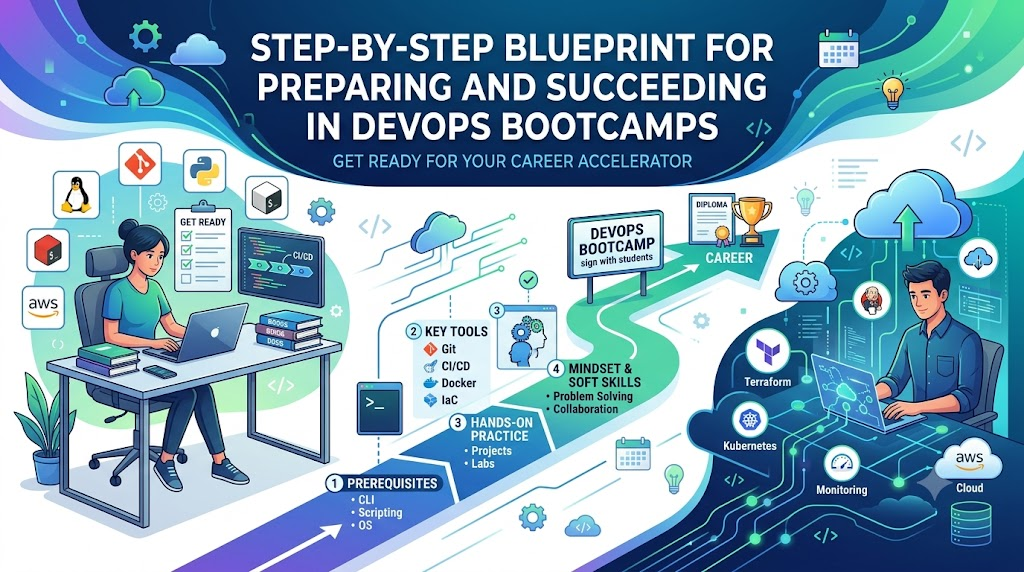
The modern software landscape moves at a relentless pace, with organizations shifting to cloud-native infrastructures and deploying updates multiple times a day. This digital transformation has created an unprecedented demand for skilled professionals who can bridge the gap between software development and IT operations through automation, continuous integration, and efficient delivery. Because traditional academic curriculums often fail to keep pace with these rapid industry shifts, aspiring engineers increasingly turn to intensive training programs to fast-track their technical transformation. However, walking into a high-intensity bootcamp cold can be overwhelming due to the sheer volume of new tools and terminology, making thorough preparation essential for long-term success. By entering a training program with a foundational understanding of core concepts through reputable platforms like DevOpsSchool, learners can focus on advanced orchestration, pipeline optimization, and architectural design rather than struggling with basic commands.
What Are DevOps Bootcamps?
DevOps bootcamps are intensive, accelerated training programs designed to teach participants the practical skills, tools, and methodologies required to work as professional DevOps engineers. Unlike traditional computer science degrees that focus heavily on theoretical mathematics, algorithms, and abstract software design, bootcamps focus squarely on real-world application, industry-standard toolchains, and operational workflows. The primary purpose of these programs is to bridge the gap between theoretical knowledge and practical execution, turning raw beginners or career switchers into confident, employable engineers in a matter of months.
The structure of a bootcamp differs significantly from traditional self-paced online courses or university semesters. Traditional courses often provide a broad overview of computer science over several years, leaving students to piece together how various technologies interact in a live production environment. Bootcamps, on the other hand, simulate real-world workplace environments. They feature project-based learning, rigorous code reviews, collaborative troubleshooting sessions, and direct mentorship from experienced industry practitioners. Learners do not just read about continuous integration or cloud architecture; they build pipelines from scratch, configure virtual networks, and deploy containerized applications to live cloud environments.
Determining who should join these programs depends heavily on current background and career ambitions. System administrators wanting to transition away from manual server maintenance, software developers aiming to understand deployment lifecycles and infrastructure automation, and fresh graduates seeking an accelerated path into the technology sector are all ideal candidates. Even professionals coming from non-technical backgrounds find success if they possess strong problem-solving abilities, patience, and a willingness to commit to rigorous daily practice. The ultimate career outcomes are exceptionally promising, opening doors to roles such as DevOps Engineer, Site Reliability Engineer, Cloud Engineer, and Automation Specialist.
| Traditional Course | DevOps Bootcamp |
| Focuses on deep theoretical concepts and computer science foundations. | Focuses on practical, hands-on tool mastery and real-world workflows. |
| Spans several years with broad, multi-disciplinary curriculums. | Condensed into an intensive timeline ranging from 12 to 24 weeks. |
| Assesses progress primarily through written exams and academic assignments. | Assesses progress through live projects, code reviews, and scenario-based labs. |
| Teaches isolated technologies with limited integration practice. | Teaches end-to-end toolchain integration and modern delivery pipelines. |
Why Preparation Matters Before Joining
Entering an intensive technical training program without prior preparation is akin to running a marathon without ever jogging a block. While it is technically possible to finish, the journey will be filled with unnecessary strain, frustration, and a higher risk of falling behind. Pre-bootcamp preparation builds a mental scaffolding that allows new information to anchor securely. When an instructor introduces concepts like containerization or version control, a prepared student recognizes the underlying patterns rather than struggling to comprehend every single new command or piece of terminology.
Preparation significantly reduces stress and cognitive overload. During an intensive program, new topics are introduced at a rapid-fire pace. If a student spends half their study time trying to figure out how to navigate a Linux terminal or how SSH keys work, they miss the deeper architectural lessons being taught. By mastering these foundational prerequisites beforehand, learners ensure that their cognitive energy is preserved for complex problem-solving and advanced tool mastery. This directly translates into better project performance, higher grades on practical assessments, and a much smoother overall educational experience.
Furthermore, pre-bootcamp preparation fosters a mindset of independent inquiry and resilience. Technology changes constantly, and no training program can teach every single tool or feature an engineer will encounter in the workplace. By spending weeks or months researching and practicing basic concepts independently before day one, learners train their brains to research documentation, troubleshoot error logs, and find solutions autonomously. This self-reliance is the single most valuable trait an aspiring engineer can develop, ensuring higher confidence during interviews and superior performance on the job.
Consider a practical example. Imagine two students entering a training module on automated deployment pipelines. Student A has never touched a command line, does not know what a file path is, and has never used Git. Student B spent three weeks learning basic Linux navigation, file permissions, and git commit workflows before starting. Student A spends the entire lab session struggling with syntax errors and basic file navigation, missing the core concepts of the deployment pipeline. Student B glides through the basic navigation, focuses entirely on understanding the pipeline configuration file, and finishes the lab with a deep conceptual grasp of the automation process.
Skills You Should Learn Before Joining
Linux Fundamentals
Linux is the absolute bedrock of modern cloud computing and infrastructure management. The vast majority of cloud servers, containers, and orchestration platforms run on Linux distributions. Before stepping into any technical training program, aspiring engineers must feel completely comfortable operating within a Linux environment without relying on graphical user interfaces.
Mastering the file system hierarchy is the first critical step. Learners should understand where configuration files reside, how logs are stored, and how to navigate directories using absolute and relative paths. Essential command-line utilities for text manipulation, process monitoring, and package management must become second nature. Understanding user permissions, access control lists, and ownership models is vital for maintaining secure environments. Finally, process management concepts, including how background jobs run, how system services are controlled, and how to terminate unresponsive processes, form the daily bread and butter of operational work.
Networking Basics
Infrastructure automation and cloud orchestration rely entirely on networks working reliably behind the scenes. Without a firm grasp of fundamental networking concepts, troubleshooting deployment failures or connectivity issues becomes an exercise in guesswork.
Learners should study the Internet Protocol, understanding how IP addresses, subnets, and routing tables allow machines to communicate across local networks and the broader internet. The Domain Name System must be understood as the hierarchical naming structure that translates human-readable addresses into machine-readable IPs. Web protocols, specifically HTTP and HTTPS, are critical for understanding how web applications communicate, how status codes indicate success or failure, and how TLS certificates secure data in transit. Secure Shell protocol knowledge is mandatory for remote server administration, key generation, and secure tunneling. Finally, basic firewall concepts, security groups, and port management must be understood to secure cloud environments properly.
Git & Version Control
Version control is the mechanism by which software development and infrastructure engineering remain collaborative, traceable, and organized. Every configuration file, pipeline script, and infrastructure-as-code template must live in a version control system.
The core Git workflow involves understanding how local repositories track changes through staging areas and commits. Learners must master branching strategies, recognizing how feature branches allow developers to work in isolation before merging code back into main production branches. Handling merge conflicts is an inevitable part of collaborative engineering; students must practice resolving overlapping edits calmly and accurately. Remote repositories hosted on platforms like GitHub or GitLab must become familiar territory, with a strong grasp of pulling, pushing, and managing pull requests.
Basic Scripting
Automation is the defining characteristic of modern operational engineering. While full software development mastery is not required for beginners, the ability to read and write basic scripts is non-negotiable.
Bash and shell scripting form the primary interface for automating repetitive tasks on Linux servers. Learners should understand how to declare variables, read user input, and implement conditional statements to control script execution based on system states. Loops are essential for processing lists of files, servers, or user accounts in bulk. Writing simple maintenance scripts that back up databases, check disk space usage, and rotate log files provides the exact practical foundation needed before tackling advanced infrastructure-as-code tools.
Cloud Basics
Modern infrastructure no longer lives in physical server rooms; it resides in elastic, globally distributed cloud platforms. Understanding the core service models of major cloud providers is a mandatory prerequisite for any professional entering the industry.
Students should explore at least one major cloud ecosystem, such as Amazon Web Services, Microsoft Azure, or Google Cloud Platform. Within these environments, core building blocks must be thoroughly understood. Compute services, including virtual machines and serverless execution environments, form the processing power of the cloud. Storage options, ranging from object storage for unstructured data to block storage for virtual disks, must be evaluated correctly. Identity and Access Management concepts are critical for maintaining security and enforcing the principle of least privilege. Basic cloud networking, including virtual private clouds, subnets, and internet gateways, rounds out the foundational knowledge required.
Containers
Containerization revolutionized how applications are packaged, shipped, and executed across disparate environments. Containers encapsulate an application and all its dependencies into a single lightweight unit that runs reliably anywhere.
Learners should understand the fundamental difference between traditional virtual machines and containers, noting how container engines share the host operating system kernel for maximum efficiency. Building custom container images using Dockerfiles is a core competency, requiring knowledge of base images, layer caching, and working directories. Running and managing container lifecycles, exposing ports, mounting volumes for persistent data storage, and utilizing container registries to store and share images must be practiced extensively before starting formal training.
CI/CD Fundamentals
Continuous Integration and Continuous Delivery represent the cultural and technical engine of modern software delivery pipelines. These automated workflows ensure that code changes are tested, verified, and deployed safely without manual intervention.
Students should understand the continuous integration philosophy, where developers merge code changes frequently into a central repository, triggering automated builds and unit tests immediately. Continuous delivery and deployment take this further, automating the release process down to staging and production environments. Familiarity with popular automation servers and workflow engines like Jenkins, GitHub Actions, or GitLab CI provides the conceptual framework needed to design, debug, and maintain complex multi-stage delivery pipelines.
DevOps Learning Roadmap Before Bootcamp
| Week | Goal | Practice Exercises |
| Week 1 | Master Linux Command Line | Navigate directories, manage file permissions, install packages via apt/yum, and monitor active system processes. |
| Week 2 | Understand Core Networking | Configure local IP settings, test connectivity with ping/traceroute, analyze HTTP traffic, and generate SSH keys. |
| Week 3 | Learn Git Version Control | Initialize local repositories, create branches, make atomic commits, push to GitHub, and resolve simulated merge conflicts. |
| Week 4 | Write Basic Shell Scripts | Create Bash scripts featuring variables, conditional branching, loops, and automated error handling. |
| Week 5 | Explore Cloud Fundamentals | Provision a free-tier virtual server, configure security groups, attach block storage, and manage IAM user policies. |
| Week 6 | Containerize Applications | Write a multi-stage Dockerfile, build a container image, run local containers with persistent volumes, and push images to a registry. |
Setting Up Your DevOps Practice Environment
Having the right hardware and software environment is essential for smooth learning. While enterprise systems run on heavy hardware, a standard modern laptop with at least 8GB of RAM and a quad-core processor is sufficient for initial learning. For optimal performance when running multiple virtual machines and local Kubernetes clusters, 16GB of RAM is strongly recommended.
Operating system choice matters significantly. While Windows is popular, native Windows environments can introduce compatibility challenges with many open-source DevOps tools. Using Linux as your primary operating system or utilizing the Windows Subsystem for Linux provides a native, terminal-first environment that mirrors production cloud servers. Alternatively, virtualization tools like VirtualBox or VMware Workstation allow learners to spin up isolated Linux virtual machines for safe experimentation.
Recommended Environment Setup Checklist
- Modern laptop with virtualization support enabled in BIOS.
- Linux distribution installed natively, via WSL2, or inside a VirtualBox virtual machine.
- Docker Desktop installed and configured for container management.
- VS Code or another robust text editor with terminal integration and Git extensions.
- Active GitHub account configured with SSH keys for secure repository access.
- Free-tier account on a major cloud platform for hands-on infrastructure practice.
Daily Study Plan
Consistency is the single most important factor in technical mastery. Studying for two hours every day yields far better retention and skill development than cramming for fourteen hours on a single weekend day. A balanced daily routine should blend theoretical reading with active keyboard practice and robust documentation.
| Time | Activity |
| 30 Minutes | Review theoretical concepts, documentation, or architectural diagrams. |
| 60 Minutes | Execute hands-on lab exercises, run commands, and build configuration files. |
| 30 Minutes | Document learnings, troubleshoot encountered errors, and update personal notes. |
Weekly Study Plan
- Monday: Focus on Linux system administration, user management, and advanced command-line text processing utilities.
- Tuesday: Study networking fundamentals, DNS resolution, IP routing, and secure shell configuration.
- Wednesday: Practice Git workflows, branching strategies, and collaborative repository management on GitHub.
- Thursday: Write and test Bash automation scripts to streamline repetitive operational tasks.
- Friday: Log into your cloud provider free-tier account and provision virtual servers, security groups, and storage volumes.
- Saturday: Build custom Dockerfiles, containerize sample web applications, and test local container deployments.
- Sunday: Review the week’s notes, build a small integrated project combining multiple skills, and plan the upcoming week.
Hands-On Projects Before Bootcamp
Theory alone is not enough to build engineering competence. Before entering a structured bootcamp, learners should complete several small, self-contained practical projects that test multiple foundational skills simultaneously.
| Project Name | Skills Learned | Difficulty Level |
| Linux Server Maintenance Script | Bash scripting, cron scheduling, log rotation, and disk monitoring. | Beginner |
| Personal Git Portfolio Repository | Git branching, markdown documentation, commit hygiene, and remote publishing. | Beginner |
| Containerized Web Application | Dockerfile creation, port mapping, environment variables, and image optimization. | Intermediate |
| Automated CI/CD Testing Pipeline | GitHub Actions, automated test execution, and build notification configuration. | Intermediate |
| Cloud-Hosted Static Website | AWS EC2 provisioning, security group configuration, Nginx web server installation, and DNS routing. | Intermediate |
Soft Skills Every DevOps Learner Needs
While technical proficiency with tools and platforms is mandatory, a successful engineering career requires a robust set of interpersonal and professional attributes. Engineering is fundamentally a collaborative human endeavor.
Communication is paramount. DevOps professionals act as a bridge between software development teams, quality assurance engineers, and traditional operations staff. Articulating complex architectural problems clearly, writing concise post-mortem reports, and explaining technical risks to non-technical stakeholders are essential competencies.
Problem-solving mindset and intellectual curiosity drive long-term success. Technology stacks change rapidly, and no training program can teach every edge case. An engineer must possess the patience to read cryptic error logs, search documentation meticulously, and break down complex systemic failures into manageable components. Time management and meticulous documentation ensure that operational procedures remain repeatable, transparent, and auditable across entire teams.
Common Mistakes Beginners Make
One of the most frequent traps beginners fall into is trying to learn too many tools at once. The ecosystem is vast, featuring hundreds of competing utilities for container orchestration, monitoring, and infrastructure provisioning. Trying to master every tool simultaneously leads to superficial understanding and burnout. The correct approach is to master fundamental concepts first, as tools change while core principles remain constant.
Another major mistake is ignoring Linux fundamentals in a rush to learn flashy cloud orchestration tools. Building advanced pipelines without understanding how a Linux kernel manages processes, file descriptors, and networking namespaces leaves engineers helpless when automated tools fail. Furthermore, many learners fall into the passive consumption trap, watching countless video tutorials without ever typing commands or building configurations themselves. True competence is forged only through active typing, breaking things, and fixing them. Finally, failing to maintain clean notes and documentation guarantees that valuable lessons learned during troubleshooting will be forgotten by the next day.
What Happens During a DevOps Bootcamp?
Once preparation is complete and the formal training begins, the daily structure shifts toward immersive, collaborative engineering. Days typically begin with instructor-led sessions covering core architectural concepts, design patterns, and industry best practices. These lectures are immediately followed by intensive lab sessions where students execute hands-on exercises in sandboxed cloud environments.
Assignments become progressively more challenging as the weeks advance, moving from simple script writing to complex multi-tier application deployments. Regular code reviews and peer evaluations ensure that students learn to write clean, maintainable, and secure configurations. Major milestones culminate in comprehensive capstone projects that simulate real enterprise migration scenarios. Finally, dedicated modules on interview preparation, resume building, and mock technical assessments ensure that graduates transition smoothly from the classroom to the job market.
How to Get Maximum Value From Your Bootcamp
Enrolling in a top-tier training program is only half the battle; how a student engages with the curriculum determines their ultimate return on investment. Active participation is critical. Never hesitate to ask questions when a concept seems ambiguous, as clarification early prevents misunderstandings later.
Consistency beats intensity every single time. Completing labs daily, repeating exercises until the syntax becomes second nature, and maintaining a clean, well-organized GitHub portfolio of all completed projects will set you apart from your peers. Networking with fellow students, instructors, and alumni creates an invaluable professional support system that often leads to direct job referrals long after the program concludes.
Real Success Story
Background
Aakash Sharma spent four years working as a manual software QA tester. While he understood how applications were supposed to behave, he felt stuck in a repetitive career path with limited growth potential and stagnant compensation. He wanted to transition into cloud computing and infrastructure automation but had no prior programming or system administration experience.
Challenges
Aakash faced severe imposter syndrome. The command line intimidated him, networking concepts felt like a foreign language, and the sheer number of DevOps tools mentioned online caused overwhelming anxiety. He did not know where to start or how to bridge the massive gap between his current testing role and a modern cloud engineering position.
Preparation
Before enrolling in any formal program, Aakash committed to a rigorous six-week pre-bootcamp preparation plan. He spent two hours every day mastering Linux command-line navigation, learning basic shell scripting, practicing Git branching workflows, and understanding fundamental cloud networking principles. This self-study built his foundational confidence.
Bootcamp
Equipped with a solid preliminary understanding, Aakash enrolled in an intensive, project-driven training program. Because he already understood basic Linux file structures and version control, he spent his lab time mastering advanced containerization, Kubernetes orchestration, infrastructure as code with Terraform, and complex CI/CD pipeline architectures.
Projects
During the program, Aakash built a comprehensive portfolio of practical projects. His capstone project involved provisioning an immutable multi-tier infrastructure on AWS using Terraform, containerizing a microservices application with Docker, orchestrating the deployment using Kubernetes, and automating the entire release lifecycle through a multi-stage Jenkins pipeline.
Interview
Aakash leveraged his project portfolio and newfound communication skills during interviews. When technical interviewers asked scenario-based questions about troubleshooting deployment failures or managing state in infrastructure as code, he drew directly from the hands-on labs and capstone project he built during his training.
Career Outcome
Within six weeks of graduating from his training program, Aakash successfully secured a position as a Junior DevOps Engineer at a fast-growing financial technology firm. His salary increased significantly, and he now enjoys a dynamic career designing automated cloud infrastructure and mentoring incoming junior staff.
Certifications After Bootcamp
| Certification Name | Target Audience | Difficulty Level |
| AWS Certified Solutions Architect | Cloud infrastructure learners and engineers | Intermediate |
| Certified Kubernetes Administrator | Advanced orchestration specialists | Advanced |
| HashiCorp Certified: Terraform Associate | Infrastructure-as-code practitioners | Intermediate |
| Docker Certified Associate | Containerization and microservices specialists | Beginner-Intermediate |
| Linux Foundation Certified System Administrator | Linux administrators and foundational learners | Intermediate |
Career Opportunities
The career landscape for skilled operational engineers is diverse, lucrative, and expanding rapidly. As organizations migrate increasingly complex workloads to cloud environments, specialized roles have emerged to manage, scale, and secure these distributed systems.
DevOps Engineers sit at the intersection of software development and operations, building automated delivery pipelines and maintaining cloud infrastructure. Cloud Engineers specialize in designing, provisioning, and optimizing scalable cloud-native architectures across major platforms. Platform Engineers build internal developer platforms that abstract away infrastructure complexity, empowering development teams to deploy code safely and autonomously. Site Reliability Engineers apply software engineering principles to operational problems, ensuring high availability, performance, and disaster recovery. Release Engineers focus specifically on release management, artifact versioning, and deployment orchestration.
Salary trends across these roles reflect their critical importance to modern business operations. Professionals with verified practical skills, strong portfolios, and recognized industry certifications command highly competitive compensation packages globally, making this one of the most rewarding career tracks in the technology sector.
30-Day Preparation Plan
- Day 1 to 5: Learn Linux file system navigation, permissions, and basic package management.
- Day 6 to 10: Study IP addressing, subnets, DNS resolution, and SSH key generation.
- Day 11 to 15: Master Git initialization, branching, committing, and remote repository syncing.
- Day 16 to 20: Write and execute basic Bash scripts featuring variables, loops, and conditional logic.
- Day 21 to 25: Provision a cloud free-tier account, create virtual servers, and configure security groups.
- Day 26 to 30: Build custom Docker images, run local containers, and push artifacts to a container registry.
90-Day Career Growth Plan
Month 1: Foundation & Pre-Training Preparation
Focus entirely on mastering Linux administration, networking basics, version control, and scripting fundamentals. Build a strong technical routine, study for two hours daily, and complete all pre-bootcamp readiness exercises.
Month 2: Intensive Training & Project Execution
Immerse yourself fully in your chosen training program. Absorb daily architectural concepts, execute complex hands-on labs, collaborate with peers on troubleshooting, and begin building your comprehensive project portfolio.
Month 3: Portfolio Polish & Career Launch
Finalize your capstone projects, clean up your public GitHub repositories, update your professional resume, practice mock technical interviews, and begin applying aggressively to target engineering roles.
DevOps Bootcamp Readiness Checklist
- Comfortable navigating Linux file systems and editing configuration files via terminal.
- Understands core networking concepts including IP addresses, DNS, and HTTP traffic.
- Able to initialize Git repositories, manage branches, and resolve merge conflicts.
- Capable of writing simple Bash automation scripts for file and process management.
- Familiar with cloud computing fundamentals, virtual servers, and IAM policies.
- Understands containerization concepts and can build basic Dockerfiles.
- Possesses a dedicated laptop with virtualization support and a stable internet connection.
- Maintains a dedicated daily study schedule of at least two uninterrupted hours.
Best Practices
- Consistency Over Intensity: Daily practice beats sporadic marathon study sessions every time.
- Hands-On Execution: Never rely purely on video tutorials; type every command and build every configuration file yourself.
- Thorough Documentation: Maintain organized notes and document troubleshooting steps for every error encountered.
- Automation First: Whenever you perform a repetitive administrative task more than twice, write a script to automate it.
- Relentless Curiosity: Always ask why a system behaves a certain way rather than just memorizing command syntaxes.
- Active Networking: Engage with peers, instructors, and industry professionals to build a supportive community.
Future of DevOps Learning
The engineering discipline continues to evolve at a breakneck speed, incorporating new paradigms and automation methodologies. Artificial intelligence and machine learning are increasingly integrated into operational workflows, assisting engineers with automated anomaly detection, log analysis, and incident remediation. GitOps has transformed infrastructure management, utilizing version control repositories as the single source of truth for declarative infrastructure and application deployments.
Platform engineering has risen to prominence, shifting the focus toward building internal developer portals that streamline self-service provisioning. Cloud-native architectures, serverless computing, and microservices continue to dominate enterprise software design. Furthermore, security has shifted left into the earliest phases of development through DevSecOps methodologies, ensuring vulnerability scanning and compliance checks occur continuously throughout the delivery pipeline. Staying adaptable and committed to continuous learning is the ultimate key to thriving in this dynamic ecosystem.
Frequently Asked Questions
What is a DevOps bootcamp?
A DevOps bootcamp is an intensive, practical training program designed to teach participants the technical skills, toolchains, and methodologies required to work professionally as DevOps or cloud engineers in a matter of months.
Do I need coding knowledge before joining?
Advanced software development mastery is not required, but a basic understanding of scripting logic in languages like Bash or Python is extremely helpful for automating operational workflows and writing deployment scripts.
Is Linux mandatory for a career in this field?
Yes. Linux is the operating system that powers the vast majority of cloud servers, containers, and orchestration platforms. Comfort with the Linux command line is an absolute non-negotiable prerequisite.
Should I learn Docker before starting training?
Learning containerization basics before your formal program starts gives you a massive advantage, allowing you to focus on advanced orchestration and cluster management when those modules arrive.
How long should I spend preparing before day one?
A dedicated preparation period of four to six weeks, spending one to two hours daily on Linux, networking, and Git fundamentals, is ideal for ensuring you can keep pace with an intensive curriculum.
Can absolute beginners with non-technical backgrounds join?
Yes. Many successful engineers come from non-technical careers such as customer support, sales, or liberal arts. Success depends entirely on your willingness to practice daily, think logically, and embrace continuous problem-solving.
What kind of projects should I build before my course?
Focus on projects that combine multiple skills, such as a containerized web application deployed via a basic CI/CD pipeline, an automated Linux backup script, or a static website hosted on a cloud virtual server.
Are professional certifications necessary to find a job?
While certifications are not strictly mandatory, they validate your technical competence to recruiters, demonstrate dedication, and significantly boost your resume visibility during the job search process.
How do bootcamps help with job placement?
Quality programs offer dedicated career services, resume workshops, mock technical interviews, portfolio reviews, and direct connections with hiring partner companies looking for junior engineering talent.
What is the difference between a DevOps Engineer and a Site Reliability Engineer?
A DevOps engineer focuses primarily on automating the software delivery lifecycle and bridging development and operations, while a SRE applies software engineering to operational tasks with a heavy focus on system availability and reliability.
How much time should I dedicate outside of class hours?
Expect to spend at least 10 to 15 hours per week outside of scheduled instruction time on hands-on labs, reading documentation, and building your personal project portfolio.
Will I learn Kubernetes during the program?
Yes. Kubernetes has become the industry standard for container orchestration, and virtually all comprehensive bootcamps include extensive modules covering cluster architecture, deployments, and services.
How do I choose the right training provider?
Look for programs that offer robust mentorship, active hands-on labs, real-world capstone projects, career support services, and transparent graduate employment outcomes.
What hardware specifications do I need for my practice laptop?
A modern laptop with at least 8GB of RAM, a multi-core processor, and virtualization support enabled in the BIOS is required. Upgrading to 16GB of RAM is strongly recommended for running local Kubernetes clusters.
How can I avoid feeling overwhelmed by the massive tool ecosystem?
Focus heavily on mastering core foundational principles, networking, and Linux first. Tools change constantly, but underlying architectural concepts remain consistent across every technology stack.
Final Thoughts
Embarking on a journey into cloud infrastructure and automation is one of the most career-transforming decisions you can make in the modern technology landscape. The path requires dedication, patience, and a willingness to embrace continuous problem-solving. Preparation matters deeply; walking into your training program with a firm grasp of Linux, networking, version control, and scripting sets the stage for deep comprehension and long-term success.
Remember that practice always beats passive theory. Do not just read about pipelines or containers—type the commands, break your configurations, troubleshoot error logs, and build your own functional projects. Stay consistent with your daily study routine, document your learnings meticulously, and remain curious as the technology ecosystem evolves around you. With the right mindset and structured preparation, a rewarding and dynamic career as a professional DevOps engineer is entirely within your reach.

