
Introduction
Years ago, releasing a new software feature to production was a massive, stressful event. Engineering teams would work for months to bundle hundreds of changes into a single, giant release package. Developers would stay up until midnight on a weekend, manually copying files to remote servers, running configuration scripts, and praying that nothing broke.
More often than not, something did break. A missing environment variable, an untested edge case, or a slight difference between a developer’s laptop and the production server would crash the application. This manual approach to software deployment was slow, highly risky, and deeply inefficient.
As software applications grew larger and businesses demanded faster feature updates, this traditional way of working became unsustainable. Software development teams needed a mechanism to deliver high-quality code changes quickly, safely, and predictably. This urgent need gave rise to the DevOps movement, which prioritizes automation, collaboration, and continuous improvement across the entire lifecycle of software creation.
At the absolute center of modern DevOps methodologies sits Continuous Delivery. It transforms the chaotic, high-risk manual release process into a predictable, automated, and routine event. By establishing clear guardrails around how code transitions from an engineer’s keyboard to an active user environment, it allows organizations to ship code updates with total confidence.
For engineers, students, or system administrators looking to build a career in cloud-native technologies, mastering these automated delivery pipelines is an absolute prerequisite. To build a strong foundation in these modern software paradigms, formal learning systems like DevOpsSchool offer comprehensive training tracks that teach engineers how to manage, secure, and scale these highly critical deployment architectures.
What Is Continuous Delivery?
Continuous Delivery is a software development discipline where code changes are automatically built, tested, and prepared for a release to production. It expands upon the foundations of automated code integration by ensuring that every single change passing through the system is immediately ready to be deployed to live environments.
The phrase “always ready to release” serves as the core operational law of Continuous Delivery. In a traditional software pipeline, a development cycle concludes with a distinct, often exhausting stabilization phase where QA engineers test the built software for weeks to discover latent bugs. Under a Continuous Delivery model, code is stabilized continuously throughout its development cycle. Every time an engineer commits a line of code, the system validates its production readiness immediately. Even if a business chooses not to deploy updates twenty times a day, the technical capability to do so exists at any given second.
To understand this clearly, consider a beginner-friendly analogy of a highly automated automobile manufacturing factory. In this factory, parts move down a strictly controlled production line. At each station along the assembly line, robotic mechanisms attach a component and immediately run a digital diagnostic check.
If a door is attached incorrectly, the diagnostic sensor flags the error instantly, stopping that specific phase until the error is corrected. The car does not advance to the final inspection bay until every single mid-process automated test passes perfectly. When the vehicle reaches the end of the factory line, it is fully fueled, thoroughly inspected, polished, and ready to be driven onto the road immediately. Continuous Delivery acts exactly like this factory line for software code.
Why Continuous Delivery Matters in DevOps
Implementing Continuous Delivery delivers distinct advantages to modern software engineering organizations by removing the bottlenecks that historical workflows suffered from.
Faster Software Releases
By automating the build, validation, and packaging stages, organizations compress the time it takes for a business concept to become functional software in the hands of users. Instead of waiting for monthly or quarterly release windows, features move from development to deployment in hours or days.
Drastically Reduced Deployment Risk
When updates are bundled into massive, infrequent releases, locating the root cause of a production bug is incredibly difficult because thousands of lines of code have changed simultaneously. Continuous Delivery focuses on small, incremental updates. Because changes are pushed continuously, if a bug appears, engineers can pinpoint the exact code modification that caused the failure within minutes.
Higher Software Quality
Continuous Delivery shifts testing to the absolute earliest stages of the development cycle. Automated unit, integration, functional, and security tests run against every single small modification. This unrelenting testing structure ensures that regressions and architectural flaws are caught and remediated long before they can reach a customer-facing production environment.
Enhanced Business Agility
In a competitive commercial market, user preferences shift rapidly. If an enterprise takes six months to deploy a feature response to a market trend, they lose their competitive advantage. Continuous Delivery gives leadership the ability to pivot technical strategies instantly, rolling out new product offerings or emergency hotfixes safely at a moment’s notice.
Continuous Integration vs Continuous Delivery
Beginners frequently confuse Continuous Integration (CI) and Continuous Delivery (CD) because they share overlapping tools and automation spaces. However, they represent distinct evolutionary steps along the software delivery pipeline.
| Feature | Continuous Integration (CI) | Continuous Delivery (CD) |
| Primary Objective | Frequently merge code changes into a shared repository and validate through automated builds and testing. | Ensure that the master branch of code is always in a deployable state to a production environment. |
| Core Activities | Code compilation, unit testing, syntax linting, artifact creation, and code coverage checks. | Staging environment deployment, integration testing, performance validation, and automated production readiness. |
| Automation Scope | Stops immediately after the software artifact is successfully built and basic tests pass. | Extends all the way through infrastructure configuration and staging, stopping right before live deployment. |
| Human Intervention | Fully automated and triggered by developer code push actions without manual approval. | May require a single manual business approval to execute the final push to production users. |
Continuous Integration forms the foundation of the delivery pipeline. It forces developers to integrate their code into a central repository multiple times a day. Each integration triggers an automated build and a suite of unit tests to verify that the new code does not break the existing application codebase.
Continuous Delivery is the next logical step that takes over where Continuous Integration ends. Once CI builds a stable version of the software, Continuous Delivery automates the process of moving that software artifact through staging environments, running deeper integration and performance tests, and ensuring that the application can be pushed to production safely with a single click.
How Continuous Delivery Works Step by Step
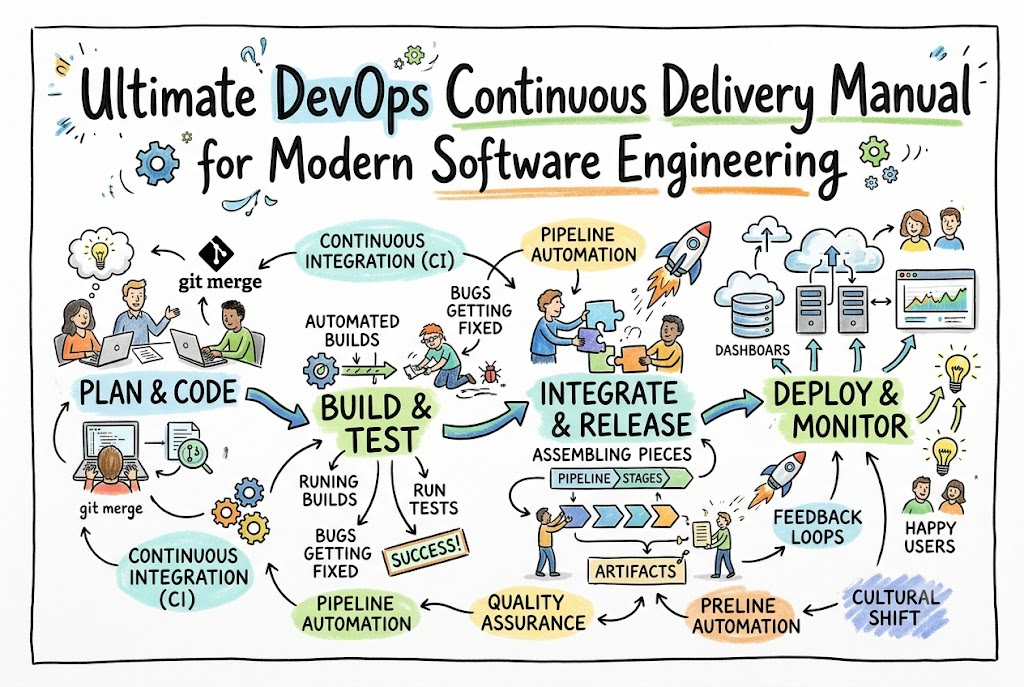
A real-world Continuous Delivery pipeline behaves like an automated conveyor belt for code changes. Let us walk through the exact journey a line of code takes through this system.
[Developer Commits Code] ──> [CI Server Builds & Unit Tests] ──> [Integration & Functional Tests]
                                                                              │
                                                                              ▼
[Live Production Update] <── [Manual / Automated Release Gate] <── [Staging Environment Deployment]
Step 1: Code Commit
The journey begins when a developer finishes writing a feature or a bug fix on their local computer. They save their changes and execute a commit command using a version control tool like Git. They then push this code change to a central repository system, such as GitHub or GitLab.
Step 2: Continuous Integration Build
The moment the central repository receives the new code, a webhook alerts the automated CI server. The server immediately provisions a clean, isolated environment, downloads the updated source code, and compiles it. If the compilation fails due to a syntax error or a missing dependency, the process halts immediately, and notifications are sent to the developer. If it compiles successfully, the server runs automated unit tests to confirm structural correctness.
Step 3: Automated Testing Expansion
Once the unit tests pass, the system generates a deployable software artifact, such as a Docker container image or a compiled package. The pipeline takes this artifact and subjects it to advanced automated testing phases. These include integration tests to ensure the code communicates correctly with databases, functional tests to verify user interfaces, and security scans to look for vulnerabilities in third-party libraries.
Step 4: Staging Environment Deployment
If the comprehensive test suite passes, the pipeline automatically deploys the software artifact into a staging environment. The staging environment is designed to be an exact technical replica of the live production system where real clients use the application. This stage checks how the software behaves under real network conditions and infrastructure configurations.
Step 5: Release Approval Gate
Once the software passes all automated validation gates inside the staging environment, it sits in a status of high readiness. In a Continuous Delivery model, the decision to push this verified code live to the production audience is treated as a strategic business decision. A authorized manager or lead engineer clicks an approval button within a release dashboard to grant permission for deployment.
Step 6: Production Deployment
The instant the release approval is given, the pipeline executes deployment automation scripts. It transfers the validated software artifact from the staging environment straight into the live production servers. The infrastructure updates smoothly, traffic routes to the new code version, and the release cycle is complete without any manual engineering errors.
Key Stages of a Continuous Delivery Pipeline
An enterprise-ready delivery pipeline contains highly specific, interconnected stages that act as gates for the software code.
| Stage | Purpose |
| Build Stage | Compiles source code, resolves dependencies, and creates immutable software packages. |
| Test Stage | Executes various automated scripts to ensure functional quality, code safety, and stability. |
| Integration Stage | Verifies that the new code version interacts flawlessly with external databases and APIs. |
| Deployment Stage | Provisions infrastructure and applies the new application package to target environments. |
| Monitoring Stage | Collects real-time system performance data and user metrics to guarantee production health. |
Build Stage
The build stage is the initial point of entry for code changes. The automated tool hooks into your version control system to catch incoming updates. It pulls the necessary runtime dependencies, optimizes front-end assets, compiles back-end binaries, and packages everything into an unchangeable, version-controlled file format. This creates an immutable artifact, meaning the exact same package built here moves unchanged through all subsequent stages, guaranteeing consistency.
Test Stage
The test stage runs multiple layers of test suites. It begins with fast-running unit tests that check individual programming functions. Once those pass, it runs code coverage analyzers to confirm that a high percentage of the codebase has been verified. It also executes static application security testing to check for hardcoded credentials, security flaws, or outdated dependencies that introduce risk.
Integration Stage
Modern software systems do not live in isolation; they connect to databases, messaging queues, cache layers, and external payment processors. The integration stage spins up temporary test versions of these external systems. It runs automated end-to-end user workflows to ensure the newly updated code reads and writes data across these boundaries without causing corruption or network timeouts.
Deployment Stage
This stage handles the complex logistics of updating active environments. Using Infrastructure as Code principles, the pipeline configures servers, load balancers, and container clusters. It safely drops the older application version and replaces it with the newly verified artifact. Advanced strategies like blue-green deployments or canary rollouts are used here to prevent system downtime.
Monitoring Stage
The pipeline’s work does not end when code is successfully deployed. The monitoring stage connects the newly updated software to logging and observability systems. It tracks CPU usage, RAM consumption, network latency, and error rate percentages. If the new code causes an unexpected surge in system errors, the monitoring guardrails can trigger automated scripts to alert teams or roll back the deployment.
Tools Used in Continuous Delivery
Building an efficient Continuous Delivery pipeline requires a collection of specialized DevOps tools working together in harmony.
| Tool | Purpose |
| Jenkins | Open-source automation server used to script highly customized, complex delivery workflows. |
| GitHub Actions | Cloud-native, event-driven orchestration tool integrated directly into version control repositories. |
| GitLab CI/CD | Built-in platform offering unified code hosting, security scanning, and pipeline management. |
| Argo CD | Declarative GitOps deployment engine built specifically to manage Kubernetes container clusters. |
| Spinnaker | Enterprise multi-cloud deployment platform designed for complex, high-volume release strategies. |
| Docker | Containerization framework used to isolate applications and guarantee identical runtime environments. |
Jenkins
Jenkins is an established open-source automation server that has formed the backbone of the DevOps industry for over a decade. It utilizes a vast plugin ecosystem that allows it to integrate with virtually any cloud provider, operating system, or source control platform. Engineers write code-based execution steps within a file called a Jenkinsfile, allowing pipeline configurations to be versioned alongside the software.
GitHub Actions
GitHub Actions has completely modernized pipeline management by embedding automation directly into your GitHub repository. It uses simple YAML files to define workflow paths triggered by repository events like pull requests or code tags. Its marketplace provides thousands of pre-made automation steps, eliminating the need to manage standalone pipeline infrastructure.
GitLab CI/CD
GitLab offers a single, unified application for the entire software development lifecycle. Its built-in CI/CD features allow development teams to easily transition from planning and coding to security scanning and Kubernetes deployment. Its native container registry and integrated security dashboards make it highly popular for enterprise teams.
Argo CD
Argo CD is a highly specialized tool tailored for cloud-native applications running on Kubernetes clusters. It follows a GitOps operational model, meaning it uses a Git repository as the single source of truth for your infrastructure layout. Argo CD continuously monitors the live cluster and automatically syncs it if it drifts from the configuration stored in Git.
Spinnaker
Spinnaker is an open-source, multi-cloud continuous delivery platform originally designed by Netflix to handle massive deployment scales. It excels at complex release strategies like canary analysis, where performance metrics of a new release are automatically evaluated against an older version before completing a rollout.
Docker
While Docker is primarily known as a containerization tool rather than a pipeline runner, it is essential for modern Continuous Delivery. By packaging an application alongside its exact operating system files, libraries, and language runtimes, Docker eliminates environmental inconsistencies. A container that tests successfully in a developer environment will run exactly the same way on a live production cluster.
Real-World Example: Manual Deployment Process
To fully appreciate the value of a Continuous Delivery pipeline, let us look at how an engineering team operates without one. Imagine a fictional software company building an online retail portal.
[Write Code] ──> [Manually Copy Files via FTP] ──> [Manual Database Update] ──> [System Downtime / Errors]
A developer spends three days writing code for a new checkout discount feature on their local computer. Once completed, they email the code files to a Quality Assurance engineer. The QA engineer manually sets up a local database, runs basic tests, and discovers that the code fails because their local computer uses a different version of Python than the developer’s machine. After hours of debugging, they fix the environment mismatch and confirm the feature works.
Next comes deployment night. At midnight, a operations engineer connects to the live production web servers using an FTP client or a manual command terminal. They copy the new files directly over the old ones. They must then manually run SQL database scripts to update the production database tables.
Suddenly, the website begins displaying severe connection errors to live shoppers. The engineer forgot that the production database requires a unique security configuration that was never documented or tested in the staging environment. Panic sets in as the team tries to figure out which files were changed, how to revert them, and how to bring the retail portal back online. The business suffers financial loss and customer frustration due to a completely manual, error-prone release process.
Real-World Example: Continuous Delivery Pipeline
Now, let us look at the exact same retail feature deployed using a modern Continuous Delivery pipeline.
[Git Push Code] ──> [Pipeline Triggers] ──> [Automated Tests Pass] ──> [Staging Check] ──> [One-Click Push to Production]
The developer completes the checkout discount feature and pushes the code update directly to the Git repository. The Continuous Delivery system detects the push and instantly spins up an automated workspace. It automatically builds a clean Docker container image containing the new code, eliminating any potential language version mismatch.
The pipeline automatically runs hundreds of unit and integration tests within minutes. Next, it deploys this container into an isolated staging environment that mimics production identically. An automated load-testing tool sends artificial web traffic to the staging app to ensure the discount feature does not slow down the checkout process.
Everything passes successfully, and a green notification appears on the team’s release dashboard. The product manager reviews the metrics, sees that the release is perfectly stable, and clicks a button marked “Approve Release.”
The pipeline handles the rest, executing a zero-downtime rolling update across the production cluster. The new code rolls out incrementally, and real customers begin using the discount feature smoothly without a single second of website downtime. If any error does escape notice, the system automatically detects the spike in failed requests and instantly reverts to the previous stable container version.
Benefits of Continuous Delivery
Embracing Continuous Delivery transforms software development from an unpredictable craft into a highly reliable engineering practice.
- Accelerated Time to Market: Features, security patches, and product enhancements reach your user base rapidly. This gives organizations a distinct competitive edge by allowing them to respond to market shifts instantly.
- Exceptional Deployment Reliability: Because software updates are broken down into small, manageable pieces and validated through standardized automation, human error is completely removed from the deployment phase.
- Drastic Reduction in Engineering Burnout: Late-night, stressful deployment marathons are replaced by routine, low-risk automated releases during normal business hours. This keeps engineering morale high and frees up time for creative product work.
- Seamless Team Collaboration: Development teams, QA engineers, and operations personnel work around a single, transparent automated pipeline. This breaks down organizational silos and builds shared responsibility for code quality.
- Optimized Financial and Resource Efficiency: Finding and fixing bugs early in the delivery lifecycle is significantly cheaper than scrambling to fix a catastrophic system failure in production.
Challenges in Continuous Delivery
While the benefits are clear, transitioning to a Continuous Delivery model requires overcoming specific technical and organizational hurdles.
Pipeline Maintenance Complexity
As an application scales, its supporting pipeline architecture grows more complex. Managing configuration code, secure access credentials, environment variables, and cloud infrastructure connections requires ongoing care and dedicated DevOps attention.
Test Automation Deficits
Continuous Delivery relies entirely on the quality of your automated tests. If a development team has low test coverage or writes fragile, flaky tests that fail randomly due to network timing issues, the pipeline becomes untrustworthy. Building a comprehensive, reliable automated test suite requires significant upfront time and effort.
Legacy Infrastructure Constraints
Monolithic legacy software systems designed decades ago often have tight architectural dependencies that make them difficult to automate. These applications may require significant refactoring, breaking them down into modular microservices or wrapping them in container environments before they can integrate cleanly with automated delivery pipelines.
Cultural and Mindset Resistance
The hardest part of a DevOps transformation is rarely the software; it is the human culture. Teams accustomed to siloed working models may resist relinquishing manual control over environments. Overcoming this requires shifts in organizational mindsets, shifting away from blame cultures and toward shared automation and continuous feedback loops.
Common Beginner Mistakes in Continuous Delivery
When starting out with Continuous Delivery, beginners and transitioning teams frequently run into predictable pitfalls. Review this checklist to avoid these common mistakes:
- [ ] Confusing Continuous Delivery with Continuous Deployment: Continuous Delivery means code is always ready to go to production but waits for a manual business approval. Continuous Deployment removes that human gate entirely, pushing every single code change live automatically. Beginners must understand this distinction before planning their automation strategies.
- [ ] Neglecting Test Automation Quality: Simply building a pipeline that compiles code without writing robust automated test scripts defeats the entire purpose of Continuous Delivery. A green pipeline that does not actually validate functionality will just deploy broken software faster.
- [ ] Overcomplicating the Initial Pipeline Layout: Beginners often try to build a massive, complex pipeline with advanced multi-cloud scaling on day one. Start simple: automate compilation, run basic unit tests, and deploy to a single test server. Expand your pipeline step by step.
- [ ] Operating Without a Rollback Strategy: Teams often focus entirely on pushing code forward while forgetting to plan for failures. If your pipeline cannot automatically revert a broken production environment to the previous stable version instantly, your delivery workflow is incomplete.
- [ ] Ignoring Pipeline Feedback Logs: When an automated build fails, beginners sometimes ignore the log files and blindly re-run the pipeline hoping it fixes itself. Treat a pipeline failure as a critical warning; read the error outputs to fix the root cause immediately.
Best Practices for Continuous Delivery
To build an efficient, secure, and resilient continuous delivery infrastructure, adopt these industry-proven engineering habits:
Automate Absolutely Everything Possible
Every step between code compilation and production deployment should run via automated configuration scripts. Eliminate manual file adjustments, interactive server commands, or custom ad-hoc configuration adjustments.
Treat Pipeline Configurations as Code
Never configure your delivery pipelines through point-and-click graphical dashboards. Write your pipeline steps as code files (such as Jenkinsfiles or YAML configurations) and store them in version control alongside your application code. This makes your deployment infrastructure reviewable, auditable, and easily reproducible.
Maintain Strict Artifact Immutability
Build your application package exactly once at the beginning of the pipeline lifecycle. Take that single, unchangeable artifact (such as a specific Docker container image tag) and promote it through staging and directly into production. Never recompile or rebuild code between different environments.
Design Fast Feedback Paths
If a code commit breaks a test, developers need to know immediately. Structure your pipeline so that fast-running checks (like syntax linting and unit tests) run first. Save long-running integration, security, and performance tests for later stages in the pipeline.
Use Actionable Security Guardrails
Incorporate automated security scanning into the heart of your pipelines. Scan your container bases for vulnerabilities and check your code dependencies for known exploits. If a severe security vulnerability is discovered, configure the pipeline to automatically halt the release process.
Role of DevOpsSchool in Learning Continuous Delivery
Understanding the theory behind Continuous Delivery pipelines is a great start, but translating that knowledge into real-world systems requires hands-on experience. Designing, debugging, and managing enterprise-grade delivery workflows requires navigating complex configurations, security management, and cloud infrastructure patterns.
This is where structured learning resources like DevOpsSchool add immense value for beginners and transitioning IT professionals. Rather than forcing students to piece together disconnected online tutorials, it provides a guided learning path centered around real-world application scenarios.
Students work directly with industry-standard tools like Jenkins, GitHub Actions, Docker, and Kubernetes to build production-ready pipelines from scratch. This practical approach teaches engineers how to troubleshoot real-world pipeline failures, manage secure access tokens, and implement advanced rollout strategies.
By focusing on the underlying architectural principles alongside hands-on tool mastery, this training helps students develop the engineering mindset required to solve complex delivery challenges across any modern enterprise environment.
Career Importance of Continuous Delivery Skills
As organizations worldwide migrate their operations to cloud environments, the market demand for engineers who understand automated software delivery continues to grow rapidly.
DevOps Engineer
DevOps Engineers own the entire automated infrastructure footprint of an organization. They design delivery pipelines, maintain central automation tools, manage access permissions, and ensure code transitions smoothly from development teams to live infrastructure.
CI/CD Engineer
A highly focused role dedicated entirely to build, release, and deployment mechanics. These specialists focus on optimizing pipeline speeds, fixing broken integration workflows, and implementing advanced automated testing systems.
Cloud Engineer
Cloud Engineers focus on building and scaling infrastructure within platforms like AWS, Azure, or Google Cloud. They use Continuous Delivery pipelines to automate infrastructure provisioning, making sure application environments are stable and repeatable.
Site Reliability Engineer (SRE)
SREs apply software engineering principles directly to infrastructure operations to ensure maximum system availability. They heavily utilize Continuous Delivery pipelines to automate system recovery, manage zero-downtime application updates, and script automated rollbacks.
Platform Engineer
Platform Engineers build internal developer platforms that simplify infrastructure for product teams. They package complex Continuous Delivery workflows into easy, self-service templates, allowing developers to safely deploy code without needing to configure complex infrastructure manually.
To succeed in these high-value career paths, professionals need a well-rounded technical skill set:
                  ┌─────────────────────────────────────────┐
                  │       CORE CD PROFESSIONAL SKILLS       │
                  └────────────────────┬────────────────────┘
                                       │
     ┌───────────────────┬─────────────┴─────────────┬───────────────────┐
     │                   │                           │                   │
     ▼                   ▼                           ▼                   ▼
┌──────────────┐   ┌──────────────┐           ┌──────────────┐   ┌──────────────┐
│ Version      │   │ Scripting &  │           │ Container    │   │ Orchestration│
│ Control      │   │ Automation   │           │ Technologies │   │ & Platforms  │
│ (Git/GitHub) │   │ (Bash/Python)│           │ (Docker)     │   │ (Kubernetes) │
└──────────────┘   └──────────────┘           └──────────────┘   └──────────────┘
Industries Using Continuous Delivery
Continuous Delivery has evolved from an experimental practice used by web startups into an essential operational standard across global industries.
SaaS Platforms
Software-as-a-Service businesses thrive on rapid feature updates and high uptime. Companies offering web-based tools utilize automated delivery pipelines to deploy hundreds of micro-updates daily without disrupting active user sessions.
E-Commerce
For online retailers, holiday shopping rushes demand high application stability. Continuous Delivery allows these businesses to deploy promotional features, adjust pricing algorithms, and apply urgent security patches smoothly while handling millions of concurrent user transactions.
Banking and Finance
Financial technology platforms must balance rapid software innovation with strict compliance rules. By building automated audit tracking, security scanning, and compliance validation directly into their continuous delivery pipelines, financial institutions release updates quickly while meeting regulatory standards.
Healthcare
Modern digital healthcare tools demand absolute reliability and strict data protection. Continuous Delivery workflows allow healthcare software teams to safely validate code fixes against privacy standards (such as HIPAA regulations) before updating electronic health record systems.
Telecom
Telecommunication enterprises manage massive networks with highly complex infrastructure dependencies. They use automated delivery systems to roll out configuration changes, upgrade system backends, and maintain service availability across global networks.
Enterprise IT
Large corporate enterprises with extensive legacy software portfolios rely on Continuous Delivery to simplify their operations. Automating their software updates reduces manual maintenance costs, breaks down departmental silos, and improves overall engineering output.
Future of Continuous Delivery
The landscape of software delivery continues to change as cloud-native applications grow more complex.
GitOps-Based Delivery
The industry is shifting toward a GitOps operational model, especially for containerized cloud environments. Instead of a pipeline pushing code to a cluster, cloud infrastructure tools continuously pull configurations from a version-controlled Git repository. This ensures the live environment state matches your source code configuration automatically.
AI-Powered Delivery Pipelines
Artificial Intelligence and Machine Learning are being integrated directly into modern delivery workflows. Future pipelines will use predictive analytics to review code commits, automatically write missing test scenarios, detect anomalous performance drops during canary deployments, and trigger smart rollbacks before users notice an issue.
Fully Automated Deployments
The ultimate goal of modern release automation is the complete removal of human intervention between a code commit and its production rollout. As automated testing, security validation, and real-time observability tools grow more sophisticated, organizations will confidently transition from manual release approvals to fully automated deployment paths.
Cloud-Native Continuous Delivery Systems
Traditional, centralized build servers are being replaced by lightweight, serverless delivery tools. These modern platforms spin up automated pipeline workspaces instantly on demand within cloud clusters, scaling down to zero when processing finishes to optimize infrastructure costs.
FAQs (15 Questions)
What is Continuous Delivery?
Continuous Delivery is a DevOps engineering practice where software changes are automatically built, thoroughly tested, and prepared for release to a production environment. It ensures that your code is always in a deployable state, ready to be launched at a moment’s notice.
Is Continuous Delivery the same as Continuous Integration?
No. Continuous Integration focuses on automatically merging developer code changes into a shared repository and running basic validation builds. Continuous Delivery takes over immediately after that, automating the process of moving those verified packages through staging environments so they are fully ready for production.
Do I need to know how to code to learn Continuous Delivery?
Yes, basic coding or scripting knowledge is highly valuable. While you do not need to be an expert software developer, you will need to understand basic programming concepts, shell scripting (like Bash), and configuration file formats (like YAML or JSON) to build and maintain pipelines.
What are the main tools used in Continuous Delivery?
The most popular tools include Jenkins for custom pipeline automation, GitHub Actions and GitLab CI/CD for built-in repository workflows, Docker for container isolation, and Argo CD or Spinnaker for cloud deployments.
Is Continuous Delivery safe for production environments?
Yes, it is significantly safer than manual deployments. Because every single code change is subjected to identical, automated validation checks, security scans, and environment tests, human error is completely removed, resulting in highly stable production environments.
What is a CD pipeline?
A CD pipeline is an automated sequence of steps that software code passes through on its way to production. It acts like a digital conveyor belt, pulling source code, compiling it, running tests, configuring infrastructure, and preparing the package for user deployment.
How does an automated rollback work?
When a newly deployed application version triggers errors or performance drops in production, monitoring tools flag the issue. The delivery pipeline can read these alerts and automatically re-route user traffic back to the previous stable software version without requiring human intervention.
Can beginners learn Continuous Delivery easily?
Yes, anyone can learn Continuous Delivery by following a structured learning path. Start by understanding version control with Git, move on to basic automation concepts, and then practice building simple pipelines using tools like GitHub Actions before moving to advanced enterprise architectures.
What is the difference between Continuous Delivery and Continuous Deployment?
In Continuous Delivery, code moves automatically through staging environments, but the final push to live production requires a human click or business approval. In Continuous Deployment, that human gate is removed entirely; every code change that passes the automated tests goes live to production automatically.
Why do companies adopt Continuous Delivery?
Companies adopt it to ship product features faster, reduce deployment risks, lower development costs, eliminate manual engineering errors, and improve overall software quality.
What is an immutable artifact in a pipeline?
An immutable artifact is a software package (like a compiled binary or a Docker container image) that is built once at the very start of the pipeline and never modified. This exact same package is promoted through staging and into production, guaranteeing consistency across environments.
How do you handle database updates in Continuous Delivery?
Database updates are handled using automated database migration scripts. These migration scripts are version-controlled alongside the application code and are executed automatically by the pipeline right before the new application version goes live.
What is a canary deployment?
A canary deployment is a release strategy where a new software version is rolled out to a tiny percentage of live users first. The pipeline monitors this small group for errors; if the software behaves correctly, it rolls out the update to the remaining user base.
What is a blue-green deployment?
A blue-green deployment is a release strategy that uses two identical production environments. “Blue” runs the current live software version, while “Green” receives the new update. Once the green environment passes live verification checks, user traffic is instantly switched over to it via a load balancer, causing zero user downtime.
How long does it take to build a standard delivery pipeline?
For a simple application, a basic pipeline using GitHub Actions can be configured in a few hours. For large enterprise systems with multiple legacy systems, security compliance checks, and complex testing layers, designing and refining the pipeline infrastructure can take weeks.
Final Thoughts
Transitioning to Continuous Delivery shifts how engineering teams think about software. As a mentor who has watched the tech industry evolve from painful manual midnight releases to fully automated deployments, I can assure you that automation is no longer optional. It is an absolute requirement for modern software engineering.
The core goal of Continuous Delivery is simple: reduce risk by breaking large, complex deployments down into small, routine, and predictable events. By automating your compilation, testing, and environment delivery loops, you protect your production systems while freeing up engineers to focus on what matters most: writing great code and building useful products.
If you are a beginner stepping into the DevOps world, remember not to let the vast ecosystem of tools overwhelm you. Focus on understanding the core architectural concepts first: version control clarity, automated testing habits, and environment consistency. Start by automating small tasks, build your pipelines gradually, and keep learning step by step.

