
Introduction
Software engineering has shifted dramatically over the past two decades. In the early days of corporate software engineering, development cycles moved slowly. Engineering organizations routinely shipped product updates once or twice a year. Programmers wrote application source code in isolation for months at a time, keeping changes on local computers or isolated branching structures.
As market demands accelerated, software teams needed to release features faster. This pressure made manual code integration highly problematic. When ten or fifteen software engineers attempt to merge thousands of lines of distinct code into a single central branch after weeks of independent work, severe architectural collisions occur. This painful scenario is often called integration hell. Teams frequently spent weeks resolving code conflicts, fixing broken builds, and hunting down regressions that slipped through manual inspection.
This costly, slow approach became unsustainable. Modern software delivery required a systematic, automated method to verify code changes immediately. Continuous Integration emerged as the structural foundation of modern software engineering to solve this problem. It replaced manual code merging and irregular testing with predictable, automated validation systems.
For anyone pursuing a career in cloud computing, system operations, or infrastructure automation, mastering this concept is essential. It serves as the primary gateway into advanced software delivery practices. To build a strong foundation in these automated workflows and modern delivery pipelines, aspiring engineers frequently utilize structured training ecosystems like DevOpsSchool, which provide comprehensive technical education on the fundamental principles of Continuous Integration alongside practical automation strategies. Understanding this methodology is not just an advantage; it is a core requirement for navigating the modern technology ecosystem.
What Is Continuous Integration?
Continuous Integration is a software development methodology where engineers merge their code updates into a shared, central repository frequently—often multiple times a day. Each integration triggers an automated verification system consisting of an isolated build phase and a comprehensive test suite. Instead of compiling applications manually on local workstations, specialized automation servers validate the code automatically to ensure the new modifications do not degrade existing features.
To understand this concept clearly, consider a manufacturing analogy:
Imagine a large commercial automobile assembly line where distinct teams build specialized components independently. One team builds steering systems, another constructs the braking infrastructure, and a third creates the chassis framework.
If these teams worked in total isolation for six months without verifying how their parts fit together, the final assembly phase would be chaotic. The bolts might not align, electrical harnesses might use incompatible voltages, and the physical dimensions could clash.
Continuous Integration acts as an automated, real-time testing jig on the factory floor. Every single time a team finishes a component, an automated system instantly checks its fit, alignment, and functionality against the rest of the car. If an item is off by even half a millimeter, an alarm sounds immediately, allowing the team to fix the blueprint before producing thousands of defective parts.
In software development, this automated assembly line ensures that the application is always functional, verifiable, and ready for further testing or deployment.
Why Continuous Integration Became Necessary
Traditional software development frameworks relied heavily on sequential phases. Engineers spent weeks analyzing requirements, months writing code, and further months passing artifacts to a separate Quality Assurance department. This siloed structure created massive disconnects between code production and functional verification.
Traditional Workflow (Siloed & Slow):
[Code isolated for weeks] ──> [Massive Manual Merge] ──> [Explosive Bug Discovery] ──> [Weeks of Debugging]
Consider a team developing a cloud-based retail application using traditional methods. One group of engineers builds a new product catalog feature, while another rewrites the checkout processing subsystem. Both groups work inside isolated local environments for eight weeks.
During this period, the product catalog team updates a core database schema to support video assets. Simultaneously, the checkout team alters the same database logic to accelerate credit card processing. Because neither team integrates their work with the other, they remain unaware of these overlapping structural modifications.
When release day arrives, the teams attempt to combine their code. The application immediately fails to compile. The database initialization script crashes, product pages display blank elements, and the checkout system rejects payments. The engineering team must then halt all feature development to spend weeks manually auditing thousands of lines of code.
Continuous Integration became necessary to eliminate these catastrophic integration events by shifting validation to an immediate, ongoing routine.
Problems Teams Faced Before Continuous Integration
The lack of automated validation systems led to systemic operational inefficiencies across engineering organizations. The table below outlines the core challenges teams faced before adoption.
| Problem | Engineering Impact | Operational Consequence |
| Code Conflicts | Multiple developers altered identical code files simultaneously without central visibility. | Teams wasted days manually resolving textual and logical merge conflicts. |
| Delayed Testing | QA teams received complete software builds only at the end of long development cycles. | Defect remediation became expensive due to the time elapsed since the code was written. |
| Slow Releases | Compiling packages, running scripts, and managing configurations required manual execution. | Production deployments occurred infrequently, limiting business agility. |
| Late Bug Discovery | Architecture level flaws remained hidden until full system configuration phases. | Critical bugs frequently escaped into production environments, impacting users. |
| Team Coordination Problems | Engineers operated without clear knowledge of modifications made by peer groups. | Codebases diverged significantly, creating fractured and unstable software architectures. |
How Continuous Integration Works
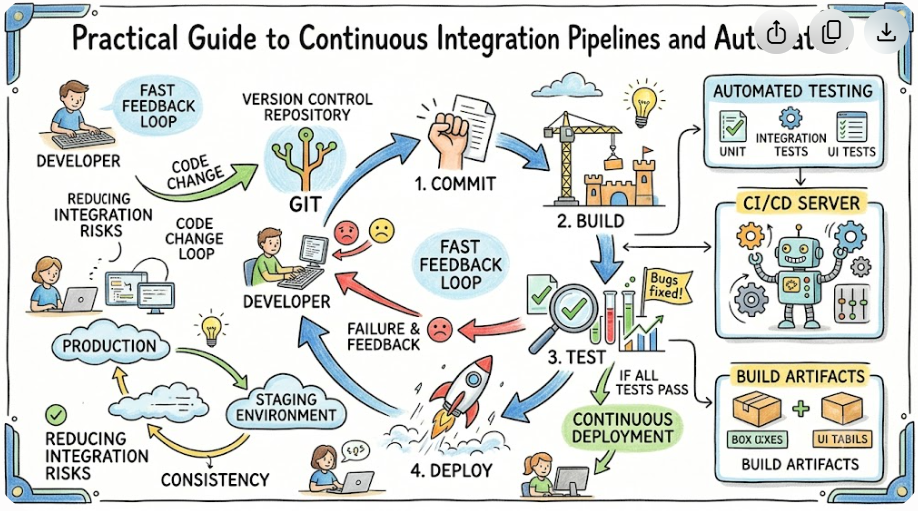
The mechanical execution of a Continuous Integration workflow follows a structured, repetitive loop. This automation cycle converts manual development activities into verifiable engineering events.
The Continuous Integration Cycle:
[Write Local Code] ──> [Git Push] ──> [Automated Build Server] ──> [Run Test Suite] ──> [Instant Feedback Loop]
1. Developer Writes Code
An engineer works on a localized workstation, implementing a specific feature or resolving a documented defect. Before sharing the work, they run minimal local checks to confirm basic functionality.
2. Code Pushed to Git Repository
The engineer pushes the completed code commits to a centralized Version Control System, such as a remote Git repository. This push event typically targets a shared feature branch or initiates a pull request into the main development branch.
3. Automated Build Starts
The central repository detects the incoming code push via webhooks and instantly alerts the dedicated CI automation server. This server allocates an isolated computing environment (such as a container or virtual machine), clones the updated source code, resolves required software dependencies, and compiles the application into binary artifacts.
4. Automated Testing Runs
Once the application compiles successfully, the CI server executes an automated testing matrix. This includes running unit tests to validate individual code functions, running code linters to enforce syntax standards, and executing integration tests to confirm subsystem compatibility.
5. Feedback Shared
The CI server aggregates all build outputs and test logs. If any test fails or compilation errors occur, the system sends immediate notifications to the engineering team via chat platforms or email. If the build succeeds, the system marks the code commit as stable and safe to merge.
Core Components of Continuous Integration
An enterprise grade Continuous Integration ecosystem relies on five core technical components working together seamlessly.
| Component | Technical Purpose | Tool Examples |
| Version Control System | Acts as the single source of truth for all source code, assets, and historical modifications. | Git, GitHub, GitLab, Bitbucket |
| Automated Build Platform | Provides the orchestration engine that compiles code and runs automated processes. | Jenkins, GitHub Actions, CircleCI |
| Testing Automation Suites | Executes validation scripts to verify code correctness without human intervention. | JUnit, PyTest, Selenium, Mocha |
| Dependency Management | Resolves, downloads, and caches external code libraries required by the application. | npm, Maven, pip, NuGet, Gradle |
| Notification Services | Communicates pipeline status updates directly to development teams instantly. | Slack, Microsoft Teams, Email alerts |
Popular Continuous Integration Tools
Selecting an automation tool depends heavily on an organization’s cloud architecture, security compliance needs, and engineering workflows.
Jenkins
Jenkins is an open-source automation server that features an extensive ecosystem of community-developed plugins. It provides deep customization options, allowing teams to build complex pipelines for legacy architectures and modern cloud applications alike. Because it requires self-hosted infrastructure management, it is highly favored by enterprises demanding total control over their data environments.
GitHub Actions
GitHub Actions builds automation workflows directly into the GitHub repository platform. Engineers write pipeline definitions using simple YAML files stored right alongside their application code. This native integration removes the need to configure external build infrastructure, making it highly accessible for beginners and distributed teams.
GitLab CI/CD
GitLab offers a unified DevOps platform that covers everything from project planning to security compliance and deployment monitoring. Its built-in CI/CD features run via simple configurations and include advanced options like automatic security scanning and container image creation out of the box.
CircleCI
CircleCI is a cloud-native automation platform optimized for speed and performance. It uses intelligent caching, parallel job execution, and resource allocation to run intensive test suites quickly, making it a popular choice for fast-moving engineering teams.
Azure DevOps
Azure DevOps is Microsoft’s enterprise-grade platform. It provides an integrated system for project management, Git hosting, and build automation. It connects seamlessly with cloud infrastructure, making it an ideal choice for large companies utilizing hybrid cloud environments.
Real-World Scenario: A Team Without Continuous Integration
To understand the practical value of these tools, let us look at the daily operations of a fictional logistics company, CargoTrack, which operates without an automated integration system.
The Manual Chaos Workflow:
[Developer A & B Push Code] ──> [Manual Compilation Fails] ──> [QA Discovers 50+ Defects] ──> [Production Deployment Delayed]
At CargoTrack, three developers—Ananya, David, and Marcus—work on a shipping coordination platform. They manage code by copying files to a shared network drive every Friday afternoon.
- The Friday Merge Session: On Friday at 3:00 PM, Ananya attempts to combine her updates with David’s work. She discovers that David modified the core shipping manifest class, changing its return types completely. Her code immediately breaks, throwing dozens of errors.
- Manual Compilation Failures: Marcus manually downloads the broken code onto his computer to help fix it. He updates his local libraries to resolve the issue, but forgets that his machine runs a different operating system version than the production servers. The code compiles on his laptop, but fails completely on the target servers.
- Delayed Bug Detection: By midnight, the team forces the application to build by manually commenting out failing tests. On Monday, the QA team tests the application and uncovers over fifty functional bugs.
- Deployment Stress: The engineering team must drop all new features to spend the next week hunting down regressions across thousands of lines of unverified code.
Real-World Scenario: A Team With Continuous Integration
Now, let us examine that same logistics company after implementing a modern Continuous Integration workflow.
The Automated CI Workflow:
[Developer Pushes Code] ──> [CI Server Runs Auto-Build & Tests] ──> [Instant Pass/Fail Alert] ──> [Stable Main Branch]
The team installs an automation server and requires everyone to push their changes to a central Git repository multiple times a day.
- The Small Commit Habit: At 10:00 AM, Ananya writes a small forty line update for the shipping manifest class. She pushes her feature branch to the repository and creates a pull request.
- Instant Automation: Within twenty seconds, the automation server spins up an isolated testing container, pulls her code, installs dependencies, and runs the entire validation suite.
- Early Defect Detection: The build pipeline fails during the integration testing phase. The system discovers that Ananya’s update inadvertently broke a shipping cost calculation function used by David’s module.
- Rapid Resolution: The automation platform immediately sends a notification to Ananya’s chat application, complete with precise error logs. Because she wrote the code just minutes ago, the logic is fresh in her mind. She fixes the calculation bug within ten minutes and pushes the update again. This time, the build passes green. The code merges cleanly into the main branch, completely avoiding Friday afternoon integration stress.
Benefits of Continuous Integration
Implementing an automated integration methodology provides significant competitive advantages to modern engineering groups.
Faster Software Delivery Cycles
Automating build and test execution allows development teams to move code from concept to completion with minimal friction. Because code verification happens automatically at every step, features reach production readiness in hours rather than months.
Superior Code Quality and Architectural Stability
Running static analysis tools and automated code linters continuously ensures that the entire engineering team follows consistent programming standards. This prevents technical debt from building up and keeps the codebase clean, readable, and easy to maintain over time.
Early Issue Detection and Reduced Remediation Costs
Finding a software defect minutes after it is written is significantly cheaper than finding it months later in production. Developers can quickly fix errors while the context is fresh, rather than wasting days reconstructing old logic.
Improved Engineering Team Collaboration
Continuous Integration removes the friction of manual code handoffs. With a shared central repository serving as the single source of truth, developers always work on top of a stable, verified foundation, minimizing team miscommunications.
Common Beginner Mistakes in Continuous Integration
When learning integration workflows, beginners frequently encounter predictable pitfalls. Review this checklist to identify and avoid common implementation mistakes.
- [ ] Ignoring Fundamental Git Principles: Attempting to build complex automation pipelines before mastering basic Git commands like cloning, branching, merging, and rebasing.
- [ ] Designing Overly Complex Pipelines Too Early: Configuring advanced parallel execution and multi stage deployments before ensuring basic compilation and unit testing work reliably.
- [ ] Skipping or Neglecting Automated Testing: Writing extensive CI configurations that compile code but run no actual test suites, rendering the verification process useless.
- [ ] Developing Poor Log Analysis and Debugging Habits: Relying on guesswork when a build fails rather than carefully reading the step-by-step console outputs provided by the CI server.
- [ ] Allowing Broken Builds to Stay Broken: Leaving a shared branch in a failed state for days, which blocks the rest of the team and undermines the purpose of continuous validation.
- [ ] Running Heavy UI Tests in the Early Stages: Placing long, slow end-to-end user interface tests early in the pipeline, which slows down the feedback loop for developers.
Best Practices for Learning Continuous Integration
To master automation engineering effectively, follow this structured learning roadmap.
- [ ] Master Version Control First: Spend time practicing branching strategies, managing merge conflicts, and structuring commits cleanly inside Git before moving to automation tools.
- [ ] Start with Simple Build Definitions: Create a basic repository using a simple language like Python or Node.js, and configure a single stage pipeline that simply checks syntax.
- [ ] Practice Automation Regularly: Avoid manual work whenever possible. Write simple shell scripts or YAML configurations to automate repetitive tasks on your local machine.
- [ ] Build Small, Sample Projects: Create a multi-stage pipeline from scratch that compiles an application, runs a small suite of unit tests, and generates a functional build artifact.
- [ ] Study Real-World Configuration Files: Review open source projects on GitHub to examine how experienced teams construct their pipeline configuration files.
Role of DevOpsSchool in Learning Continuous Integration
Mastering automated workflows requires a strong balance of theoretical understanding and hands-on engineering practice. This is where structured learning programs can make a major difference for aspiring professionals.
Learning Progression:
[Core Theory] ──> [Hands-on Lab Exercises] ──> [Real-World Project Simulation] ──> [Production Readiness]
Ecosystems like DevOpsSchool focus on helping students build a practical automation mindset. Instead of just memorizing tool interfaces, learners explore the underlying principles of pipeline design, version control management, and automated testing architectures.
Through hands-on laboratory exercises and realistic project scenarios, students learn how to set up automated build environments, manage external dependencies, and configure robust notification feedback loops. This practical training helps beginners confidently transition from writing code on a single local computer to managing enterprise grade automation systems.
Career Importance of Continuous Integration Skills
Automation proficiency has become a foundational requirement across many different technology roles.
DevOps Engineer
DevOps engineers design, build, and maintain the underlying infrastructure that powers automated pipelines. They focus on optimizing build performance, ensuring system security, and managing cloud resource consumption.
Software Engineer
Modern software developers do not just write application features; they also manage the integration configurations that validate their code. Understanding CI pipelines allows developers to write cleaner code and debug issues independently.
QA Automation Engineer
Quality Assurance professionals rely on CI platforms to run comprehensive automated test matrices automatically. They integrate functional, security, and performance test suites directly into the delivery lifecycle.
Site Reliability Engineer (SRE)
SREs focus on system uptime and platform reliability. They monitor integration pipelines to ensure that incoming code updates do not degrade system performance or cause unexpected downtime in production.
Platform Engineer
Platform engineers build internal developer portals and reusable tooling templates. They provide pre-configured CI templates that help internal development teams launch new microservices quickly and securely.
Industries Using Continuous Integration
Automated verification is essential across every sector that relies on modern software delivery.
CI Applications Across Industries:
* SaaS Platforms     ──> Multi-tenant Feature Flags & Daily Updates
* Banking & Finance  ──> Compliance Auditing & Security Vulnerability Scanning
* Healthcare         ──> Automated HIPAA Validation & Diagnostic Data Protection
* E-Commerce         ──> Zero-Downtime Scaling & Dynamic Inventory Testing
SaaS Platforms
Cloud-based software providers need to ship features, updates, and bug fixes to users daily. Continuous Integration allows them to deploy frequent, minor updates safely without taking systems offline.
Banking and Finance
Financial systems demand high security and strict regulatory compliance. Automated pipelines allow banks to run mandatory security scans, code compliance checks, and audit trails automatically on every single line of code before it nears production.
Healthcare
Healthcare software must balance rapid innovation with absolute data security and regulatory compliance. Automated testing systems ensure that application updates preserve patient privacy protections and meet strict medical software standards.
E-Commerce
Digital retail platforms experience major traffic swings and require constant feature updates. Automated pipelines allow these companies to test dynamic inventory systems and promotional features under load before major shopping events.
Telecom and Enterprise IT
Telecommunications providers manage massive, complex software ecosystems. They use automated integration to coordinate updates across legacy mainframe systems, mobile user applications, and distributed edge computing hardware.
Future of Continuous Integration
As software systems grow more complex, automation pipelines are evolving to become smarter, faster, and more secure.
AI-Assisted Testing and Optimization
Modern pipeline systems are incorporating machine learning models to optimize test execution. These smart engines analyze incoming code changes and run only the specific tests impacted by those modifications, drastically reducing build times.
Cloud-Native and Serverless Pipelines
Traditional, self-hosted build servers are increasingly being replaced by serverless execution models. Modern pipelines spin up ephemeral computing containers on demand to run builds, shutting them down instantly when finished to optimize resource costs.
DevSecOps and Security Integration
Security validation is shifting directly into the early stages of the integration cycle. Automated pipelines now routinely run static application security testing, dependency vulnerability scans, and container image audits as part of the standard build process.
FAQs
What is Continuous Integration?
Continuous Integration is a development practice where engineers regularly merge their code updates into a central repository. Each push triggers an automated system that builds and tests the code to catch defects early.
Why is Continuous Integration important?
It eliminates the long, error-prone manual merging phases that teams face when working in isolation. By automating validation, it reduces software bugs, improves overall code quality, and helps teams deliver updates much faster.
Is Continuous Integration difficult for beginners to learn?
The core concepts are straightforward and easy to understand. Beginners usually find it accessible as long as they learn version control fundamentals first before trying to build complex automation pipelines.
Do I need strong coding skills to use Continuous Integration tools?
You do not need to be an expert developer, but you should understand basic programming concepts. Writing pipeline configurations typically involves using clear, structured text formats like YAML or JSON.
What tools are most commonly used for Continuous Integration?
The most widely used platforms include Jenkins, GitHub Actions, GitLab CI/CD, CircleCI, and Azure DevOps.
Is Jenkins still relevant in the modern DevOps landscape?
Yes. While cloud-native alternatives are growing quickly, Jenkins remains highly relevant due to its massive plugin ecosystem and wide adoption across large enterprises that require self-hosted infrastructure.
What is the difference between Continuous Integration and Continuous Delivery?
Continuous Integration focuses on automatically building and testing code on every update. Continuous Delivery takes that a step further by automatically preparing those validated builds for deployment to testing or production environments.
Can beginners practice Continuous Integration workflows at home for free?
Yes. Platforms like GitHub Actions and GitLab CI/CD offer free usage tiers with hosted runners, allowing anyone to build and practice automation pipelines using personal code repositories.
What is a build artifact?
A build artifact is the compiled, functional output generated by a successful pipeline execution—such as a binary file, a ZIP archive, or a Docker container image—that is ready for testing or deployment.
How often should developers merge their code when practicing CI?
Engineers should ideally merge their changes at least once or multiple times a day. Keeping code updates small makes validation easier and prevents complex integration conflicts.
What happens when a build pipeline fails?
When a failure occurs, the automation system stops the pipeline immediately and notifies the engineering team. The team treats fixing the broken main branch as a high priority to ensure work remains stable.
What is a linter and why is it used in CI?
A linter is a static analysis tool that inspects code without running it. It flags syntax errors, formatting deviations, and potential code smells to ensure the team maintains consistent style standards.
How do webhooks fit into Continuous Integration workflows?
Webhooks are automated notification triggers. When a developer pushes code to a Git repository, the platform sends a real-time HTTP request to notify the CI server to start a new build pipeline instantly.
Can you run performance testing inside a CI pipeline?
Yes. While basic pipelines focus on rapid unit testing, teams frequently configure secondary, specialized stages to run automated performance and load tests against the application.
What comes after mastering Continuous Integration?
Once you understand core integration workflows, the next step is learning Continuous Delivery and Continuous Deployment strategies, alongside configuration management and infrastructure-as-code tools.
Final Thoughts
Continuous Integration is fundamentally a cultural software engineering practice supported by automation tools, rather than just a software tool itself. It requires development teams to maintain the shared discipline of breaking large code updates down into small, manageable commits and integrating them frequently.
By automating the repetitive compilation and testing steps that used to be done manually, teams can save hours of engineering time and catch bugs early when they are easiest to fix. For anyone building a career in DevOps, cloud architecture, or systems engineering, mastering these automated workflows is essential. Start with simple projects, focus on building clean pipelines, and practice consistently to develop a strong automation mindset.

