
Introduction
Modern software development has moved away from the monolithic, slow-moving release cycles of the past. Today, companies deploy updates daily, sometimes even hourly. As applications grow in complexity, the challenge of merging code from dozens or hundreds of developers becomes significant. This is where Continuous Integration, or CI, becomes essential.
Without a structured approach to integrating code, teams often fall into the trap of “integration hell,” where developers spend weeks trying to merge conflicting changes, resulting in broken builds and delayed releases. Understanding CI is no longer just a “nice to have” skill; it is a fundamental requirement for anyone aspiring to work in software engineering, QA, or DevOps.
This guide is designed to walk you through the fundamentals of CI. We will strip away the jargon and look at the practical reality of how code moves from a developer’s machine to production. Whether you are a student, a fresher, or a professional looking to sharpen your DevOps skills, this article provides the foundation you need. For those looking for structured, hands-on experience, resources like DevOpsSchool offer comprehensive training that mirrors the real-world pipelines discussed here.
By the end of this guide, you will understand not just what CI is, but why it is the backbone of reliable software delivery.
What Is Continuous Integration?
At its simplest level, Continuous Integration is a software development practice where developers merge their code changes back to the main branch as often as possible. Once the code is merged, it is automatically built and tested.
Think of it like a group writing a book. In a traditional setting, each author writes their chapters separately for months. When they finally try to combine them, they find the characters have different names, the plot holes are massive, and the tone is completely inconsistent. Fixing this requires rewriting the entire book.
In the CI model, each author writes a single paragraph, submits it for review, and the system immediately checks if it matches the style and tone of the existing chapters. If it does not, they are notified instantly to fix it. This prevents the “big merge” nightmare at the end of the project.
In software terms, CI is the practice of automating the integration of code changes. It ensures that the software is always in a “buildable” state and that new code does not break existing functionality.
Why Continuous Integration Became Necessary
In the early days of software engineering, teams would work in isolation for weeks or months. This led to a phenomenon called “Integration Hell.” Because developers were not communicating through code integration, they were effectively working on different versions of the software.
As businesses demanded faster feature releases and higher quality, the old method became a bottleneck. Manual testing was slow, and identifying which specific change caused a bug was nearly impossible because the integration involved thousands of lines of code.
CI was born out of the need for speed and reliability. It forces developers to integrate their work frequently, which limits the “blast radius” of any errors. If a break happens, you know it was caused by the code pushed in the last hour, not the last month.
Problems Without Continuous Integration
When teams operate without CI, the entire development cycle suffers. The following table highlights common issues that emerge in manual integration environments.
| Problem | Business Impact |
| Integration Conflicts | Developers spend more time resolving merge conflicts than writing new features. |
| Delayed Testing | Bugs are discovered weeks after the code is written, making them harder to fix. |
| Production Bugs | Unstable code reaches the end-user because of insufficient testing. |
| Slow Releases | The “release day” becomes a stressful, all-hands-on-deck event. |
| Team Silos | Developers are disconnected, leading to inconsistent coding standards. |
How Continuous Integration Works
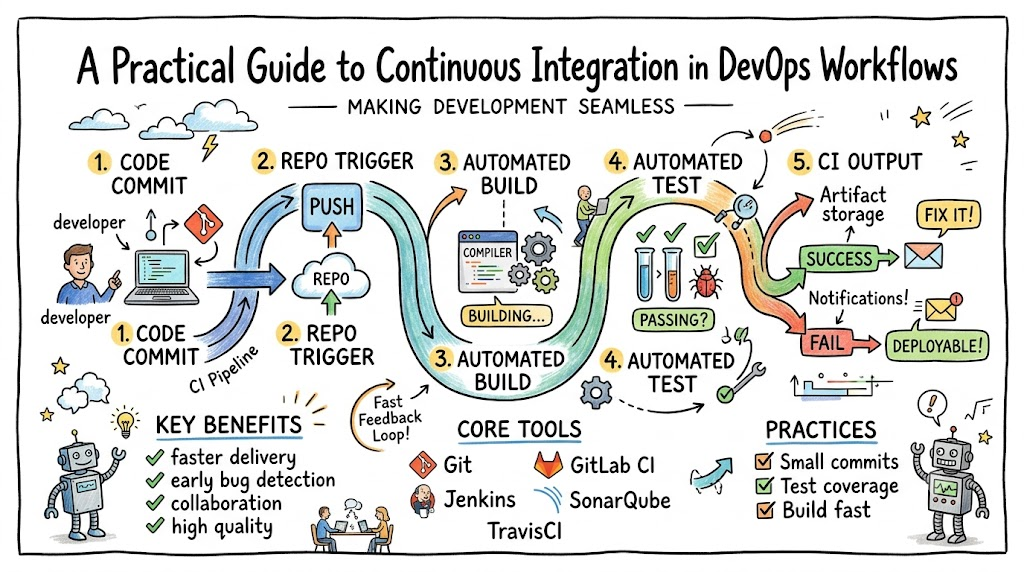
The CI workflow is a cycle that keeps the codebase healthy. Here is the standard progression of a CI workflow:
- Code Commitment: A developer finishes a task or fixes a bug and pushes their code to a central version control system, such as Git.
- Automated Trigger: The CI server (like Jenkins or GitHub Actions) detects the new code and automatically triggers a pipeline.
- Automated Build: The system attempts to compile the code. If the code cannot compile, the process stops, and the developer is alerted immediately.
- Automated Testing: Once the build is successful, the system runs automated tests (unit tests, integration tests).
- Feedback: The results are reported back to the developer. If tests fail, the developer fixes the issue. If they pass, the code is considered safe to merge into the main branch.
This cycle happens continuously, throughout the day, every day. It provides a tight feedback loop that keeps development moving forward without pauses for long-form debugging.
Key Components of a CI Pipeline
To implement CI, you need specific components that work together. Understanding these parts is critical for any DevOps engineer.
| Component | Purpose |
| Source Control | Stores the code (e.g., Git) and acts as the source of truth for the project. |
| Build Automation | Compiles code, manages dependencies, and packages the application. |
| Automated Testing | Runs suites of tests to verify code quality and functionality. |
| Dependency Management | Ensures all required libraries and external components are present. |
| Notifications | Alerts the team immediately via email or chat if a build or test fails. |
Popular Continuous Integration Tools
There are many tools in the DevOps ecosystem. For a beginner, the choice of tool matters less than understanding the underlying process, but knowing the industry standards is helpful.
| Tool | Primary Use |
| Jenkins | An open-source automation server; highly customizable and very common in legacy and modern environments. |
| GitHub Actions | Integrated directly into GitHub; excellent for developers already using GitHub for code storage. |
| GitLab CI/CD | A built-in CI/CD tool that is part of the GitLab platform; offers a cohesive, all-in-one experience. |
| CircleCI | A cloud-native CI/CD platform that focuses on speed and scalability. |
| Azure DevOps | A comprehensive suite including boards, repos, and pipelines, widely used in enterprise environments. |
Real-World Example: Team Without Continuous Integration
Imagine a team working on an e-commerce website. The developers work on their local machines. They only push their code to the shared server every Friday.
On Friday afternoon, they try to merge all the code. Developer A changed the database structure, but Developer B did not know and wrote code assuming the old structure. Developer C deleted a file that Developer D needed. The system crashes. The team spends the entire weekend working late to fix the mess, stress levels are high, and the release is delayed. The business loses money, and morale drops.
Real-World Example: Team Using Continuous Integration
Now, imagine the same team using CI. Developer A pushes code in the morning. The CI pipeline immediately attempts a build and runs tests. It detects the conflict with the database structure within minutes.
The CI tool sends an automated notification to Developer A and the team lead. Because it was caught in the morning, they fix the structure within 30 minutes. The code is then integrated successfully. By the end of the day, the software is deployed without drama. This is the difference CI makes: it turns a chaotic, high-risk event into a routine, low-risk process.
Benefits of Continuous Integration
The advantages of implementing CI are cumulative. As the team gets better at using CI, the benefits become more pronounced.
- Faster Development: Developers spend less time fixing old bugs and more time building new features.
- Better Software Quality: Constant testing ensures that minor issues do not grow into massive system failures.
- Early Bug Detection: By testing every change, you find bugs near the source, which is cheaper and faster than finding them later.
- Improved Collaboration: Teams are forced to communicate through their code commits, ensuring everyone is aligned.
- Reduced Risk: Because changes are small, the risk of a “catastrophic” failure is significantly lowered.
Common Beginner Mistakes in CI
When starting out, it is common to make mistakes. Learning to avoid these early will save you significant time.
- Ignoring Automated Testing: A CI pipeline without tests is just a “Continuous Build” system. Without testing, you have no quality assurance.
- Over-Complicating Pipelines: Beginners often try to build complex, multi-stage pipelines from day one. Start simple: Build -> Test.
- Poor Git Practices: Not committing often or writing poor commit messages makes it difficult to trace failures.
- No Monitoring: If the build fails, it must be visible. If the team ignores the notifications, the CI system becomes useless.
- Not Fixing Failures Immediately: When a build fails, the team should prioritize fixing it before moving on to new features. A “broken build” culture is a sign of poor discipline.
Best Practices for Learning Continuous Integration
To truly grasp CI, you need to go beyond reading. You need to practice. Use this checklist as your learning roadmap.
- [ ] Master Git fundamentals (commit, push, pull, branches, merge).
- [ ] Set up a basic project (e.g., a simple web app) on your local machine.
- [ ] Choose one CI tool and create a pipeline that builds your project.
- [ ] Write at least five unit tests for your project.
- [ ] Configure your CI tool to run those tests automatically on every push.
- [ ] Introduce a bug intentionally to see if your CI pipeline catches it.
- [ ] Learn how to fix a failing build pipeline.
Role of DevOpsSchool in Learning CI
Understanding CI is not just about tools; it is about mindset. Learning environments like DevOpsSchool are designed to bridge the gap between theory and practice. By providing hands-on labs and real-world scenarios, these programs allow students to experience the challenges of pipeline management in a safe, controlled setting. The emphasis on real-world pipelines ensures that learners understand not just how to click buttons, but how to architect solutions that scale for enterprise needs.
Career Importance of Continuous Integration Skills
In the current job market, CI is a foundational skill for several technical roles.
- DevOps Engineer: You are expected to design and maintain the CI/CD infrastructure that keeps the business running.
- Software Engineer: Modern developers are responsible for the quality of their code; knowing how to integrate it into a CI pipeline is a daily requirement.
- QA Automation Engineer: Your role has shifted from manual testing to writing code that tests code within the CI pipeline.
- SRE (Site Reliability Engineer): CI/CD is the mechanism for delivering reliable services; understanding it is core to SRE responsibilities.
- Platform Engineer: You build the internal platforms that developers use, and CI tools are a primary part of that platform.
Industries Using Continuous Integration
CI is not limited to tech giants. It is an industry standard across the board.
- SaaS Platforms: Companies building subscription software rely on CI for hourly deployments.
- Banking & Finance: Financial institutions use CI to maintain high security and compliance while updating services.
- Healthcare: Medical software requires rigorous testing, which CI provides through automated verification.
- E-Commerce: Platforms need to release features and promotions quickly without breaking the checkout process.
- Telecom: Managing massive networks requires highly automated software delivery pipelines.
Future of Continuous Integration
CI is evolving. The next generation of CI will be smarter and more integrated.
- AI-Assisted Testing: AI will help generate test cases and predict which code changes are most likely to introduce bugs.
- Smarter Pipelines: Pipelines will become more intelligent, automatically optimizing build speeds and resource usage.
- Cloud-Native CI/CD: CI tools will continue to shift toward serverless and ephemeral environments that only exist when a build is running.
- Security Integration: “Shift Left” security means security scanning will be a mandatory part of every CI pipeline, not an afterthought.
FAQs
- What is Continuous Integration?It is a development practice where developers frequently merge code changes into a central repository, where builds and tests are automatically run.
- Why is CI important?It detects bugs early, reduces integration conflicts, and ensures that the software is always in a deployable state.
- Is CI hard to learn?The concept is simple, but implementing it effectively requires discipline, knowledge of version control (Git), and an understanding of automation scripts.
- Do I need coding skills to learn CI?Yes. While you do not need to be a senior developer, you need basic coding knowledge to write the scripts and tests that run within the pipeline.
- What tools are used for CI?Popular tools include Jenkins, GitHub Actions, GitLab CI/CD, CircleCI, and Azure DevOps.
- Is Jenkins still relevant?Yes, Jenkins remains widely used due to its massive plugin ecosystem, especially in large enterprises with legacy systems.
- What comes after CI?Continuous Delivery (CD) and Continuous Deployment (CD). CI focuses on building and testing; CD focuses on automating the release process.
- Can beginners learn CI?Absolutely. Start by learning Git, then move to creating a simple automated build for a small project.
- Does CI require expensive software?No. Many industry-standard CI tools offer free tiers for personal projects and small teams.
- Is CI the same as DevOps?No. CI is a practice/technique within the broader DevOps philosophy, which emphasizes collaboration, automation, and continuous improvement.
- How does CI impact software quality?By running tests automatically, it ensures that regressions are caught immediately, maintaining high standards for the codebase.
- Can I use CI for non-software projects?Technically, CI is for software. However, the philosophy of “constant feedback and automation” can be applied to configuration management or infrastructure-as-code.
- What is a “build” in CI?A build is the process of converting source code into a runnable application or library.
- How often should I integrate code?As often as possible. Daily integration is standard, but many teams integrate multiple times a day.
- Does CI solve all bugs?No. CI catches integration bugs and code errors. It does not replace the need for thoughtful design or manual exploratory testing.
Final Thoughts
Continuous Integration is not just a collection of tools; it is a discipline. It is about committing to a culture where quality is checked at every step rather than left to the end of the development cycle. As you begin your journey in DevOps, remember that automation should exist to serve the team, not to complicate it. Start simple, practice consistently, and focus on the fundamentals. The goal is to make your integration process so reliable that it fades into the background, allowing you to focus on what really matters: building great software.

