
Introduction
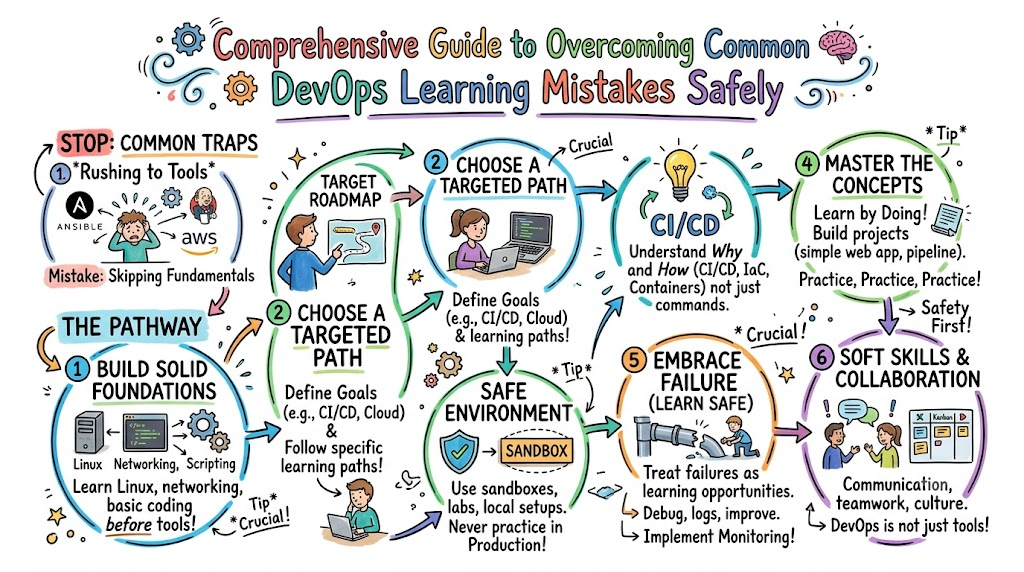
Starting your journey into the world of cloud automation can feel like stepping onto a runaway train. Many engineering professionals, system administrators, and fresh university graduates enter this domain hoping to transform their careers rapidly. However, a significant percentage of these ambitious individuals find themselves completely paralyzed within the first few weeks of study.
The core issue does not stem from a lack of technical capability or intellect. Instead, it arises because the domain represents a massive shift in how systems are designed, deployed, and maintained. Beginners are regularly confronted with a vast universe of terms, practices, and overlapping paradigms.
When you look at the modern landscape, you see an overwhelming collection of tools for containerization, infrastructure management, provisioning, and monitoring. Trying to digest all of this information at once without a structured blueprint causes immense mental exhaustion. This state of confusion forces many promising candidates to abandon their goals far too early.
To navigate this journey successfully, you must embrace a structured framework built on patience, fundamental engineering principles, and targeted mentorship. If you find yourself struggling to make sense of the educational path, utilizing a dedicated training resource like DevOpsSchool can help you establish a clear, ordered methodology that protects you from common instructional traps.
Consider the case of an infrastructure professional who decides to learn automation. This engineer might spend their first week trying to configure a complex Kubernetes cluster before they have even learned how to write a basic shell script or manage environment variables. This disjointed approach is precisely why structured guidance matters so much when addressing the initial learning curve.
Why Beginners Struggle When Learning DevOps
The primary catalyst for early failure in this field is severe tool overload. Beginners look at modern industry architectural diagrams and see twenty different platforms working together in a single deployment pipeline. They erroneously conclude that they must master every single one of these specialized systems before they can qualify for an entry-level operational role.
This misconception creates a sense of profound panic. The individual spends a day on configuration management, a day on container orchestration, and another day on infrastructure as code. Because they never slow down long enough to grasp the underlying engine powering these systems, they fail to develop any functional engineering muscle memory.
Furthermore, technology evolves at a staggering speed. A tool that was considered an industry standard two years ago might be replaced or augmented by a cloud-native micro-framework tomorrow. When learners focus entirely on clicking buttons within a specific user interface rather than studying architectural patterns, they find their knowledge becomes obsolete almost immediately.
This rapidly shifting landscape makes it difficult to maintain a steady course without an experienced mentor pointing out what is foundational versus what is merely transient.
Finally, a deep confusion regarding the ideal educational roadmap paralyses freshers and career switchers alike. Without an explicit, linear pathway, students jump haphazardly from advanced cloud computing courses back to basic programming tutorials. They lack a reliable mechanism to assess whether they are actually gaining functional engineering competence or simply collecting superficial theoretical knowledge.
Overview Table: Common DevOps Learning Mistakes
| Mistake | Why It Hurts Learning |
| Learning too many tools at once | Creates extreme cognitive fatigue and prevents deep structural understanding of infrastructure core patterns. |
| Ignoring Linux basics | Leaves the student completely unable to configure secure server environments, manage file systems, or debug live systems. |
| Skipping networking concepts | Leads to broken infrastructure deployments, unroutable container systems, and silent application communication failures. |
| Avoiding hands-on practice | Produces a superficial form of comprehension that breaks down completely during real-world system incidents. |
| Watching tutorials only | Traps the learner in a passive state of compliance where they can only duplicate predefined environments. |
| Ignoring cloud fundamentals | Results in poorly optimized, insecure cloud environments that incur massive accidental operational costs. |
| Learning Kubernetes too early | Forces the beginner to manage advanced cluster state machines before they understand basic application runtimes. |
| Comparing yourself with experts | Destroys personal confidence and causes premature burnout by setting impossible short-term performance targets. |
| Focusing only on certifications | Produces credentials that are unsupported by actual engineering capabilities, causing failure during technical interviews. |
| No projects or portfolio | Leaves the candidate without any tangible public validation to prove their automation skills to prospective companies. |
Mistake #1: Trying to Learn Too Many Tools at Once
The desire to build a competitive resume often drives beginners to learn ten different engineering technologies simultaneously. A learner might try to study Jenkins, GitLab CI, GitHub Actions, Tekton, and Argo CD all within the same calendar month. This chaotic approach creates a situation where the student memorizes specific configuration syntax without ever processing the underlying purpose of continuous integration.
[Chaos Approach]: Jenkins + GitLab + GitHub Actions + Tekton + Argo CD (Simultaneously)
                                 │
                                 ▼
                     [Extreme Cognitive Fatigue]

[Structured Approach]: Master 1 Tool (e.g., GitHub Actions) ──► Understand Core CI/CD Patterns
When you overload your mind with competing software packages, you fail to see that every single one of these platforms is simply trying to execute a series of basic tasks: pulling source code, running test suites, compiling binary assets, and pushing deployment packages to a target environment.
By focusing entirely on the surface-level variations between different configuration syntaxes, you miss out on learning how to architect a resilient, predictable automated pipeline.
Consider a beginner named Rahul who reads several job descriptions online. He immediately downloads five different automation tools onto his laptop, attempts to configure all of them simultaneously, and ends up with a broken local machine and a complete lack of clarity.
The practical lesson here is clear: choose exactly one foundational tool for each domain area and stick with it until you can configure it completely from memory. Once you master the underlying philosophy of that tool, transitioning to an alternative platform later in your career becomes a straightforward task.
Mistake #2: Ignoring Linux Fundamentals
An alarming number of modern software students try to enter the cloud automation space while operating exclusively within a graphical desktop environment. They view the terminal as an outdated relic of past decades rather than the foundational engine of modern global enterprise infrastructure. Nearly every major container instance, public cloud hypervisor, and automation server runs on a variant of the Linux operating system.
If you skip learning the fundamentals of the command line, you will find yourself completely helpless when an automated deployment script encounters a file permission error on a remote staging host. You will not know how to inspect process trees, analyze system log files using standard utilities, or manage user access rights properly. This deficiency turns every minor configuration hiccup into an insurmountable roadblock.
[Linux Foundation: File System, Permissions, SSH, Processes]
                             │
                             ▼
  [Advanced Layer: Containers, Orchestration, Cloud Compute]
Imagine trying to debug a complex container deployment when you do not understand how standard input, output, and error streams operate. You will spend hours searching online for solutions to basic environmental issues that could have been identified in seconds with a simple command line utility.
To build a reliable career, you must spend quality time mastering directory navigation, text manipulation tools, SSH key configurations, process management flags, and basic shell scripting structures.
Mistake #3: Skipping Networking Basics
Modern cloud architecture is entirely reliant on network communication. Every time a microservice communicates with a relational data store, an application load balancer distributes incoming user traffic across an auto-scaling group, or a container fetches a secret from an isolated management vault, network protocols are hard at work. Skipping these core principles is one of the most widespread DevOps roadmap mistakes made by self-taught engineers.
Without a working knowledge of the OSI model, IP addressing schemes, subnetting rules, DNS resolution behaviors, and firewall configuration states, your deployments will face constant errors. You will construct infrastructure components that are physically incapable of reaching one another, resulting in obscure connection timeout messages that leave you guessing at random solutions.
[Application Layer]  ──► [DNS Resolution / Load Balancers]
                                     │
                                     ▼
[Transport Layer]    ──► [TCP/UDP Port Allocation]
                                     │
                                     ▼
[Network Layer]      ──► [IP Routing / Subnets / CIDR Blocks]
Consider an engineer who builds an elegant containerized application, only to watch it fail silently because they assigned conflicting IP ranges to their private subnets. They spend days rewriting their application code, completely unaware that the issue is entirely caused by a fundamental network routing mistake.
You must learn how domain names resolve to IP addresses, how routing tables direct data across public and private pathways, and how specific ports secure network gateways from unauthorized external access.
Mistake #4: Avoiding Hands-On Practice
Reading high-level architectural blog posts and highlighting chapters in an enterprise infrastructure textbook can give you a false sense of security. It is incredibly easy to convince yourself that you understand a complex automated deployment process when you are simply reading a well-written summary of the workflow. True engineering competence, however, can only be forged through hands-on practice.
When you avoid opening a code editor and executing commands yourself, you miss out on experiencing the vital debugging cycles that define professional operations work. Real learning occurs when a configuration file fails to parse correctly, forcing you to carefully analyze syntax errors, investigate environment states, and look up reference documentation to identify what went wrong.
┌────────────────────────────────────────────────────────┐
│               The Real Engineering Cycle               │
└─────────────────────┬──────────────────────────────────┘
                      │
                      ▼
             [Write Custom Config]
                      │
                      ▼
            [Encounter System Error]  ◄──┐
                      │                  │  (Iterative
                      ▼                  │   Debugging)
            [Analyze Log Documents]      │
                      │                  │
                      ▼                  │
            [Fix Underlying Fault]  ─────┘
If you only interact with automation workflows as abstract ideas, you will struggle when asked to build an operational system from scratch.
You need to write custom configuration files, deliberately cause systems to fail, observe the resulting error messages, and systematically repair those faults. This iterative debugging process is how professional engineers build the deep intuition required to manage complex production systems.
Mistake #5: Only Watching Tutorials
Getting trapped in the passive loop of video consumption is a major obstacle that stalls the growth of many junior developers. A student can sit comfortably on their sofa and watch an expert build a complete cloud deployment infrastructure over the course of ten hours. The instructor makes the entire process look effortless because they have already spent days resolving bugs before hit record.
This passive viewing experience creates an illusion of competence. The beginner feels like they are making massive progress because they are watching complex tasks get executed smoothly. However, the moment they close the video and try to build a clean pipeline on their own without a pre-made script, they often find themselves completely stuck.
[Passive Tutorial Loop]:
 Watch Expert ──► Follow Scripted Steps ──► Fake Sense of Mastery ──► Real-World Collapse

[Active Discovery Loop]:
 Build Raw Project ──► Break Environment ──► Read System Logs ──► Core Skill Acquired
To break free from this limiting cycle, you must treat video tutorials as brief introductory overviews rather than comprehensive blueprints. After watching a short instructional segment, immediately minimize the window and try to build the project using your own variations.
Change the naming conventions, integrate a different database version, or deploy the environment to a distinct region. Forcing yourself to navigate these unexpected variations is how you build real engineering resilience.
Mistake #6: Ignoring Cloud Fundamentals
Some learners mistakenly believe that using a public cloud provider simply means spinning up virtual machines instead of buying physical desktop hardware. They bring outdated, rigid server management habits into modern, elastic cloud environments. This lack of strategic cloud understanding leads directly to fragile architectures and massive, unexpected monthly cloud bills.
[Traditional Mindset]: Fixed Server Resources ──► Manual Scaling ──► Vulnerable Perimeters
                                                                            │
                                                                            ▼ (Shift)
                                                                            │
[Cloud-Native Mindset]: Dynamic Ephemeral Nodes ──► Auto-Scaling ──► Zero-Trust IAM Policies
Public cloud ecosystems require an entirely fresh approach to systems engineering. You need to understand that cloud compute instances are inherently temporary resources that can be terminated or replaced at any time. If you do not learn how to design stateless application architectures, leverage managed object storage, configure decoupled message queues, and implement strict identity and access management policies, your systems will remain vulnerable and inefficient.
Consider an organization that migrates an old monolithic application directly to a high-tier cloud compute instance without setting up any auto-scaling rules or managed database systems. The platform quickly becomes overwhelmed by a sudden spike in user traffic, causing a complete system outage while consuming thousands of dollars in unoptimized resource costs.
Learning the foundational core of cloud resource allocation, identity management, and cost optimization is an essential step that you cannot afford to skip.
Mistake #7: Jumping Into Kubernetes Too Early
Container orchestration platforms like Kubernetes are among the most powerful and exciting technologies in modern enterprise infrastructure. Because of the massive industry demand for container orchestration skills, many beginners try to learn Kubernetes during their very first month of study. This hasty approach almost always results in intense frustration and confusion.
[Premature Leap]:
 Basic Linux ──► KUBERNETES CLUSTER (Result: Total Confusion, System Failures)

[Logical Progression]:
 Basic Linux ──► Network Routing ──► Isolated Container Engines ──► KUBERNETES ORCHESTRATION
Kubernetes is designed to solve complex operational challenges for massive, distributed microservice environments. It introduces a large number of abstract concepts, including control planes, custom network proxies, distributed state storage, automated service discovery, and declarative configuration models.
If you try to learn all of these advanced concepts before you have mastered running isolated container images on a local machine, you will find yourself completely overwhelmed by the architectural complexity.
Before you touch a single Kubernetes deployment file, you must have a clear understanding of how an isolated container engine packages application code, resolves local volumes, and maps network ports on a single host machine.
Mastering the fundamentals of basic container runtimes first gives you the essential context needed to understand why an advanced container orchestration platform is necessary to manage these environments at scale.
Mistake #8: Comparing Yourself With Experienced Engineers
It is easy to fall into the trap of comparing your initial progress with senior automated systems architects who have been managing global production environments for twenty years. You might see an expert effortlessly diagnose a complex distributed system failure within seconds using a series of advanced commands, and feel deeply discouraged by your own slow progress.
[Your Starting Point] ──────────────────────┐
                                            │
                                            ├─► [The Danger Zone: Unfair Comparisons]
                                            │   (Causes Burnout, Impostor Syndrome)
[Senior Architect's 20-Year Muscle Memory] ─┘
This unfair comparison completely ignores the thousands of hours of quiet, frustrating troubleshooting that the senior engineer had to go through to build that deep intuition. They are not smarter than you; they have simply made and repaired significantly more configuration mistakes than you have even attempted yet.
Every time they quickly fix an obscure system bug, they are leveraging years of muscle memory built from resolving previous system failures.
When you judge your early efforts against that level of experience, you invite impostor syndrome and mental burnout.
Your goal should never be to match the performance of a seasoned industry expert in your first few months. Instead, focus on competing with your past self. Ensure that your technical understanding today is slightly more advanced than it was yesterday, and let compounding knowledge take care of the rest over time.
Mistake #9: Focusing Only on Certifications
The modern technology landscape is filled with various professional certification paths. While earning a recognized industry credential can help validate your dedication and structure your studies, treating these exams as a golden ticket to a high-paying job is a major mistake.
[Certification Paper Path]:
 Memorize Dumps ──► Pass Multiple-Choice Exam ──► Zero Real-World Troubleshooting Skills

[True Engineering Path]:
 Write Configuration Code ──► Break Real Environments ──► Fix Infrastructure ──► Verifiable Mastery
Many entry-level candidates fall into the trap of memorizing multiple-choice answers from online practice exams to collect as many certification badges as possible. This approach creates an alarming gap between official credentials and actual engineering ability.
When these certified individuals face a technical interview where they are asked to debug a live broken system, they are often unable to perform basic tasks. They struggle to write a functional automation script or explain how traffic moves through a virtual private network.
Hiring managers can spot this lack of practical experience within minutes. Use certification paths as a helpful guide to structure your personal study roadmap, but always back up that knowledge by building real, working projects in a terminal environment.
Mistake #10: Not Building Real Projects
The ultimate validation of your skills as an automation engineer is a public portfolio of functional projects. Many students spend months completing small, disjointed sandbox exercises from online courses without ever combining those separate components into a complete, working application delivery pipeline.
[Fragmented Study]:
 Isolated Script + Isolated Dockerfile + Isolated IAM Policy = No Unified Context

[Portfolio Portfolio Project]:
 App Repository ──► GitHub Actions CI ──► Artifact Registry ──► Automated Cloud Engine Deployment
A collection of disconnected configuration snippets does not demonstrate to a hiring team that you understand how to design and manage an end-to-end delivery ecosystem. Companies want to see that you can link separate development tools together into a cohesive system that solves a real business problem.
Without a public repository showcasing clean, documented infrastructure automation code, your profile will struggle to stand out in a competitive job market.
To prove your capabilities, you must build an integrated project that mimics an authentic enterprise workflow. For example, create an application code repository, configure a pipeline that automatically runs test suites on every commit, packages the application into an optimized container image, pushes that asset to a private registry, and automatically deploys it onto an isolated cloud compute cluster.
Documenting this complete architecture in a public repository provides clear, undeniable proof of your technical competence.
Real-World Example: Beginner Learning DevOps the Wrong Way
To see how these common DevOps learning mistakes play out in real life, let us follow the journey of a junior system administrator named Amit.
Amit decides he wants to transition into an automation engineering role within three months. He looks at a complex industry roadmap online and immediately signs up for four different video courses covering AWS, Kubernetes, Terraform, and Jenkins all at once.
[Amit's Chaotic Blueprint - High Stress, Zero Mastery]
Week 1: Tries to write complex Terraform files without learning cloud resource rules.
Week 2: Forces himself into Kubernetes configs before understanding basic Linux permissions.
Week 3: Watches 40 hours of passive videos at double speed to finish the course fast.
Result: Complete burnout, broken local configurations, and failure in technical interviews.
Amit spends his first week trying to write advanced infrastructure provisioning scripts without learning how basic cloud networks or storage components operate under the hood. In his second week, he jumps straight into complex Kubernetes configuration files, copy-pasting code blocks without understanding how Linux file permissions or process trees work.
He spends his evenings watching hours of video tutorials at double speed, convincing himself that he is making great progress simply because he is finishing the courses quickly.
By the end of the month, Amit faces a minor configuration issue on his local machine. Because he skipped learning basic networking principles and system logging utilities, he has no idea how to troubleshoot the error. He feels completely overwhelmed by the chaotic mess of technologies he tried to learn simultaneously.
Frustrated, burnt out, and filled with self-doubt, Amit concludes that automation engineering is simply too difficult for him and abandons his study goals entirely.
Core Lessons Learned from Amit’s Mistakes
- Avoid Speed Over Substance: Attempting to race through advanced technical topics without mastering foundational concepts always leads to confusion.
- Stop Blindly Copy-Pasting: Copying configuration blocks without understanding the purpose of each line prevents you from developing real troubleshooting skills.
- Master One Layer First: You cannot build a stable house without a solid foundation; ensure your Linux and networking basics are rock-solid before touching orchestration tools.
Real-World Example: Beginner Learning DevOps Successfully
Now let us look at a much better approach by following the journey of an IT professional named Sarah. Sarah wants to transition into an automation career, but she decides to follow a structured, step-by-step strategy. She focuses on mastering one core area of engineering before moving on to more complex systems.
[Sarah's Structured Blueprint - Balanced, Progressive Mastery]
Month 1: Focuses completely on Linux command line, text tools, and basic networking logic.
Month 2: Learns to package simple web apps into optimized Docker containers locally.
Month 3: Automates a single web app container deployment onto a cloud machine using GitHub Actions.
Result: Strong technical confidence, a functional public project portfolio, and job offers.
Sarah dedicates her entire first month to mastering the Linux command line. She practices navigating file systems, managing user permissions, configuring secure shell connections, and writing simple automation scripts. She also spends time learning how data flows through subnets, ports, and DNS architectures.
During her second month, Sarah introduces a single container platform: Docker. She learns how to package a basic web application into an optimized image, manage data volumes, and set up local container networks. She builds these environments manually dozens of times until she understands the lifecycle of an isolated application process completely.
In her third month, Sarah explores continuous integration by building a clean workflow in GitHub Actions. She links her application repository to a cloud provider, automating the entire build and deployment process onto a single virtual machine instance.
When she encounters a configuration bug, she uses her command line skills to inspect the system logs and systematically resolve the issue. Sarah documents her entire journey in a clear, well-written public repository. Within six months, she successfully transitions into a junior cloud automation role with a strong foundation for future growth.
Core Lessons Learned from Sarah’s Success
- Patience Protects You From Burnout: Focusing on one technology domain at a time keeps your studies manageable and rewarding.
- Hands-on Debugging Builds Muscle Memory: Solving real configuration errors builds the practical intuition that companies look for during technical interviews.
- Public Portfolios Open Career Doors: A well-documented, functioning end-to-end project is far more valuable to a hiring team than a collection of basic certification badges.
Common Beginner Misunderstandings
- The Speed Fallacy: Believing that you must memorize every single automation tool and syntax variant within a few short weeks to be valuable to an engineering team.
- The Coding Myth: Assuming you need a comprehensive degree in advanced computer science algorithm design to write effective automation scripts and infrastructure files.
- The Error Panic: Treating every terminal error message as a sign of personal failure rather than a normal, healthy part of the engineering discovery cycle.
- The Certification Illusion: Thinking that collecting a large stack of multiple-choice certification badges will automatically guarantee you a senior operations role without building practical projects.
- The Tool-First Trap: Focusing all your energy on learning the specific user interface of a tool instead of mastering the underlying systems engineering principles that govern it.
Best Practices to Learn DevOps Successfully
- Establish a Rock-Solid Baseline First: Spend dedicated time mastering Linux command line operations, basic shell scripting, and core TCP/IP networking logic before touching advanced orchestration tools.
- Commit to Daily Practical Application: Ensure that every single day of theoretical study is followed by hands-on configuration work inside a live terminal instance.
- Adopt a Single-Tool Focus Policy: Choose exactly one industry-standard tool for a specific domain area and learn its architecture thoroughly before exploring alternative options.
- Construct Verified End-to-End Projects: Build and maintain an integrated public portfolio project that showcases a working application delivery and infrastructure automation pipeline.
- Learn to Read System Log Documentation: Train yourself to carefully analyze error logs from top to bottom whenever an automated deployment fails, instead of guessing at random solutions.
Role of DevOpsSchool in Beginner Learning
Navigating the massive world of modern systems automation without a reliable guide can easily lead to frustration and burnout. This is where a structured, mentor-led platform like DevOpsSchool provides immense value for aspiring engineers.
Instead of leaving you to struggle through a disorganized collection of random online videos, they offer a clear, step-by-step roadmap designed by experienced operations professionals.
[Scattered Online Noise] ──► Conflicting Guides ──► Frustration & Burnout
                                                               │
                                                               ▼ (Alternative)
                                                               │
[DevOpsSchool Framework] ──► Structured Roadmap  ──► Hands-On System Laboratories
The educational philosophy at DevOpsSchool emphasizes mastering core systems engineering principles before moving on to advanced automated platforms. Their curriculum helps ensure you build a strong foundation in Linux environments, network management, and scripting basics before introducing you to complex container orchestration systems. This protective learning path saves you from the tool overload that derails so many self-taught beginners.
Additionally, their training programs focus heavily on practical, hands-on laboratory exercises. You are guided through real-world deployment scenarios where you write clean configuration code, build automated pipelines, and troubleshoot authentic system failures.
By focusing on real engineering habits rather than simple exam memorization, they help you build the deep technical intuition and confidence required to excel in professional enterprise cloud environments.
Career Importance of Learning DevOps Properly
Essential Career Roles in Modern Infrastructure
- Junior DevOps Engineer: Focuses on maintaining automated delivery pipelines, updating infrastructure configurations, and supporting software engineering teams.
- Cloud Engineer: Specializes in provisioning secure cloud resource architectures, optimizing network environments, and managing identity permissions.
- Site Reliability Engineer (SRE): Focuses on ensuring system availability, optimizing application performance, and managing automated monitoring solutions.
- Platform Engineer: Builds internal tools and automated management systems that enable development teams to deploy code independently and securely.
- Automation Engineer: Dedicated to replacing repetitive, error-prone manual deployment tasks with clean, maintainable automation scripts.
Foundational Technical Competencies You Must Develop
- Linux Systems Mastery: The ability to navigate file architectures, configure access control rights, and optimize process environments.
- Continuous Integration Pipelines: Designing reliable, automated workflows that test, compile, and package code assets automatically.
- Cloud Resource Architecture: Managing dynamic compute, storage, and networking environments across major cloud providers.
- System Observability Frameworks: Setting up automated monitoring, metrics collection, and log aggregation tools to track infrastructure health.
Industries Hiring DevOps Professionals
┌─────────────────────────────────────────────────────────────────┐
│              Enterprise Sectors Seeking Automation              │
└────┬──────────────┬─────────────┬──────────────┬────────────┬───┘
     │              │             │              │            │
     ▼              ▼             ▼              ▼            ▼
[SaaS Apps]  [Fintech Banks] [Healthcare]  [E-Commerce]   [Telecom]
SaaS Platforms
Modern cloud software applications rely on continuous update deployments to stay competitive. These organizations require skilled automation specialists to keep their delivery pipelines fast, reliable, and free from manual bottlenecks.
Banking and Financial Technologies
Financial institutions operate under strict security and regulatory compliance standards. They hire infrastructure engineers to build automated compliance frameworks, manage zero-trust network boundaries, and ensure zero downtime for global transactional platforms.
Healthcare Services
Medical technology platforms handle highly sensitive patient information every single day. They leverage automated infrastructure solutions to implement strict data encryption patterns, manage isolated cloud environments, and maintain highly available patient portals.
E-Commerce Networks
Global digital retail platforms experience massive, unpredictable shifts in user traffic during seasonal sales events. These companies depend heavily on auto-scaling cloud architectures and reliable deployment pipelines to handle traffic surges without experiencing expensive outages.
Telecommunications Corporations
As network services shift toward cloud-native software models, telecom providers need automation experts to manage large-scale distributed cloud setups, optimize data pathways, and maintain communication infrastructure.
Enterprise IT Organizations
Legacy businesses across the globe are modernizing their traditional data center frameworks. They actively recruit cloud engineers to help transition outdated applications into agile, secure, and cost-effective automated cloud architectures.
Future of DevOps Learning
The landscape of systems automation is shifting toward more intelligent, integrated, and secure deployment models. One of the most noticeable shifts is the grow of artificial intelligence within everyday operations work.
Modern engineers are increasingly using specialized AI assistants to help generate initial infrastructure drafts, analyze complex log patterns, and optimize delivery workflows.
However, this change does not make human engineering expertise obsolete. Instead, it increases the importance of mastering core fundamentals. An AI assistant can generate a configuration script in seconds, but it requires a knowledgeable human engineer to spot subtle security risks, fix complex networking bugs, and ensure the code aligns with broader architectural goals.
[Past Paradigm]: Manual Scripting ──► Rigid Server Lifecycles
                                           │
                                           ▼
[Future Paradigm]: AI-Assisted Design ──► Secure Cloud-Native Infrastructure
At the same time, the industry is moving quickly toward advanced cloud-native architectures and secure development pipelines, commonly known as DevSecOps. Security is no longer treated as a final check at the end of the deployment cycle. Instead, automated compliance scanning, vulnerability detection, and identity controls are integrated directly into every stage of the delivery pipeline.
Furthermore, platform engineering has emerged as a key discipline focused on creating seamless internal developer portals. These self-service platforms allow software teams to provision infrastructure safely without needing to manually configure every underlying cloud resource.
To stay valuable in this evolving market, you must focus on building a deep understanding of architectural design, security logic, and system integration rather than simply memorizing basic tool syntax.
FAQs (15 Questions)
Why is DevOps hard for beginners?
The domain feels difficult because it requires you to learn development concepts and system operations simultaneously. Beginners are often overwhelmed by the sheer volume of technologies thrown at them at once. It becomes much easier when you stop trying to memorize every tool and focus instead on mastering foundational skills like Linux systems management, network routing patterns, and structured scripting.
Should I learn Linux first?
Yes, mastering the Linux operating system is an absolute prerequisite for a successful career in this field. The vast majority of production servers, container environments, and automated cloud systems run on Linux. If you skip this step, you will struggle to configure applications securely, manage file permissions, or troubleshoot live environment failures.
How do I practice DevOps?
The best way to practice is to set up a clean terminal environment and build real, working deployment workflows. Start by manually configuring a web server on a local machine, then package that application into a container image. From there, write a basic continuous integration script to automate your build process, and eventually deploy the system to a public cloud provider.
Is Kubernetes hard?
Kubernetes does have a steep learning curve because it manages complex, distributed cluster architectures. However, it feels unnecessarily difficult only when beginners jump into it too early. If you take the time to master basic container engines, local storage routing, and network configurations first, understanding how Kubernetes orchestrates those components at scale becomes a logical next step.
Do certifications matter?
Certifications can serve as an excellent guide to structure your study path and show employers that you are dedicated to learning. However, a certification badge alone will not land you a job. Hiring teams value practical, hands-on capability above all else. Always back up your credentials by building a public portfolio of real, functioning automation projects.
How long does it take to learn DevOps?
For a complete beginner practicing consistently, it typically takes anywhere from six to twelve months of focused study to build professional, entry-level competence. The exact timeline depends heavily on your existing technical background and how much time you dedicate to hands-on troubleshooting every day. Consistency and regular practice are far more important than trying to rush through courses.
Can freshers learn DevOps?
Yes, university graduates and IT freshers can absolutely break into this field. While the domain used to require years of traditional systems administration experience, modern structured training paths make it accessible to dedicated newcomers. The key to success as a fresher is building a strong public portfolio that proves you possess real, practical automation skills.
Should I learn cloud first?
You should learn the fundamental principles of local systems management and basic networking logic before diving deep into public cloud platforms. Once you understand how operating systems communicate over a standard network, learning how to provision and scale those resources inside a cloud ecosystem becomes much easier to grasp.
What language should I learn for DevOps?
Python is widely considered the best programming language for beginners in this field due to its clean syntax, readability, and massive use in automation tasks. Additionally, you should learn Bash scripting for daily system administration work. As you progress into advanced cloud infrastructure environments, learning Go will also become highly beneficial.
Can I learn DevOps without coding?
While you do not need to write complex application algorithms every day, you cannot avoid coding entirely. Modern infrastructure is managed using code. You will regularly write automation scripts, configuration files, and infrastructure blueprints. Embracing basic programming concepts early on will make your automation journey much smoother.
What is the difference between DevOps and Agile?
Agile is a project management philosophy focused on breaking down software development into small, iterative, and user-focused cycles. DevOps extends this collaborative mindset into system operations, focusing on automating the delivery pipelines, infrastructure setups, and monitoring tools needed to deploy those software iterations safely and quickly.
Why do deployments fail in production?
Most production failures stem from a lack of environmental consistency between development and staging states. A configuration parameter, database version, or network permission flag is often modified manually in one location but forgotten in another. This is precisely why automating your entire setup using code is so critical to maintaining reliable systems.
Is Docker still relevant today?
Yes, containerization remains a core foundational technology of modern cloud infrastructure. While the underlying engine standards have evolved over time, the practical skills you learn by building Docker containers—such as isolating applications, managing dependencies, and configuring local container ports—are essential for modern deployment workflows.
How do I prepare for technical DevOps interviews?
Focus your preparation on demonstrating practical troubleshooting skills. Be ready to explain the structural logic behind your public projects, write clean automation scripts on a whiteboard, and talk through how you systematically diagnose system failures using log files. Practical engineering intuition is what interviewers look for most.
Why are cloud costs so high for beginners?
Beginners often accidentally incur high cloud fees by launching powerful resource instances and leaving them running indefinitely when they are not in use. To avoid surprise bills, always set up strict billing alerts on your learning accounts, use low-tier free resources whenever possible, and ensure you tear down your practice environments as soon as you finish your daily study session.
Final Thoughts
Building a successful career in cloud automation requires patience, a structured roadmap, and a commitment to continuous learning. It is completely normal to encounter errors, feel confused by advanced syntax, and find the sheer number of modern tools a bit overwhelming at first. Every experienced systems architect you see in the industry today was once a beginner struggling to fix a broken terminal configuration.
The secret to long-term success is choosing consistency over speed. Instead of trying to race through ten different automation tools in a single month, dedicate yourself to truly understanding the core fundamentals of systems engineering.
Master the Linux command line, learn how data moves through network subnets, and practice packaging simple applications into containers. Every hour you spend building a rock-solid foundation will pay massive dividends as you advance to more complex orchestration platforms.
[Professional Consistency Journey]
👨💻 Step-by-Step Fundamentals ──► Daily Terminal Practice ──► Resilient Career
Be patient with your progress, view every error message as a valuable learning opportunity, and stay focused on building real, working projects. With a structured approach and the right mindset, you will cut through the noise, beat the common learning traps, and build a rewarding career in modern cloud infrastructure.

